 English
 العربية
 Deutsch
 Español
 Français
 Italiano
 Português
 Русский
 Türkçe
 Tiếng Việt
Free Online UUID Generator — Generate Random UUIDs Instantly
OKemall UUID Generator — The Complete Guide to Generating UUIDs Online
Every developer has faced this moment: you need a unique identifier for a database record, an API resource, a file name, or a session token, and you need it now. You could use an auto-incrementing integer — but that exposes how many records you have. You could write a random string generator — but you risk collisions. You could install a UUID library — but you are in the middle of prototyping and just need one identifier to keep moving.
A UUID (Universally Unique Identifier) is the right answer for all of these problems. It is a 128-bit value, typically displayed as 36 characters (32 hexadecimal digits plus 4 hyphens), that is mathematically guaranteed to be unique across all space and time for all practical purposes. The probability of generating a duplicate UUID v4 is so astronomically low that you are more likely to be struck by a meteorite while winning the lottery on the same day.
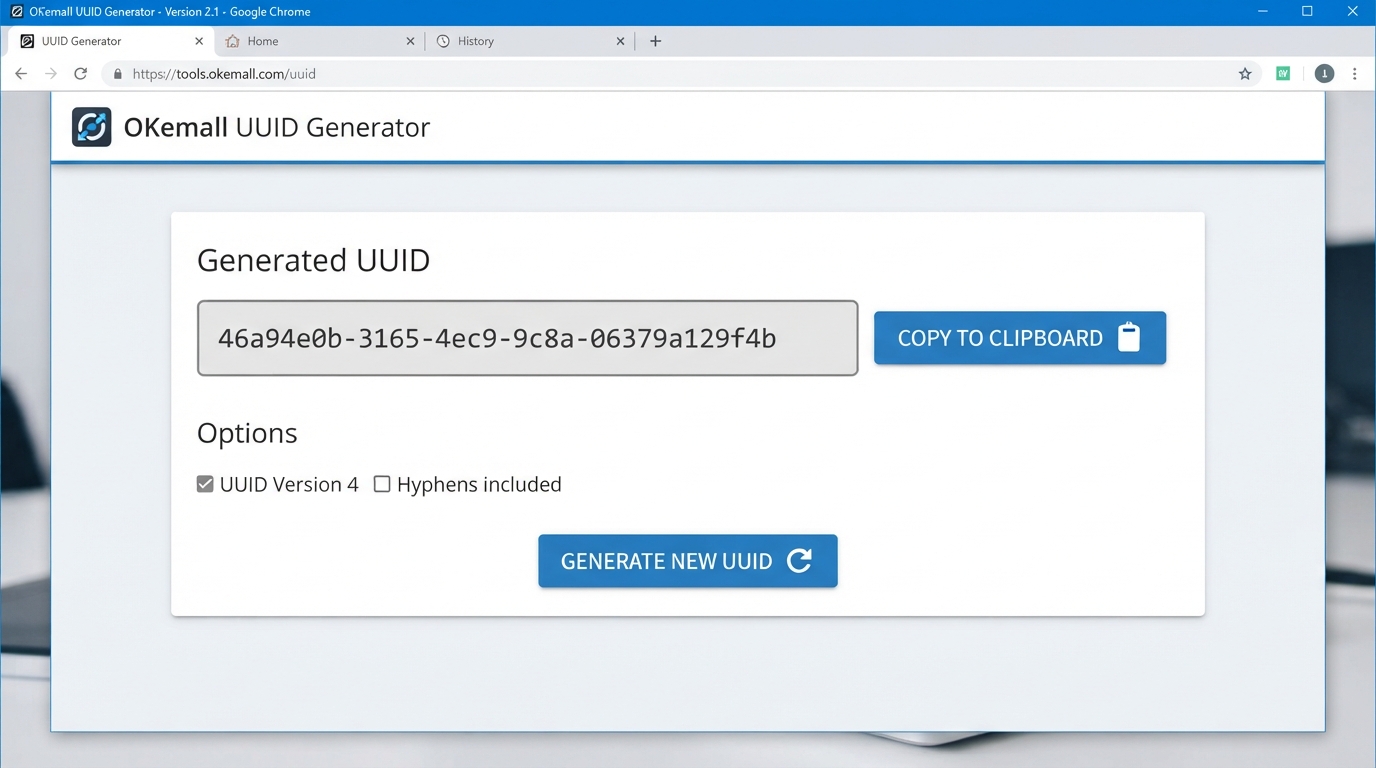
The OKemall UUID Generator produces these identifiers with a single click. Open the page. Click Generate. A fresh UUID v4 appears in the read-only display field. Click the copy button. Paste it wherever you need it. No configuration. No registration. No limits. Just the unique identifier you need, exactly when you need it.
In this guide, we will explore what UUIDs are, the different UUID versions, where UUIDs are used in real-world development, and why a one-click generator belongs in every developer's bookmark bar.
What Is a UUID?
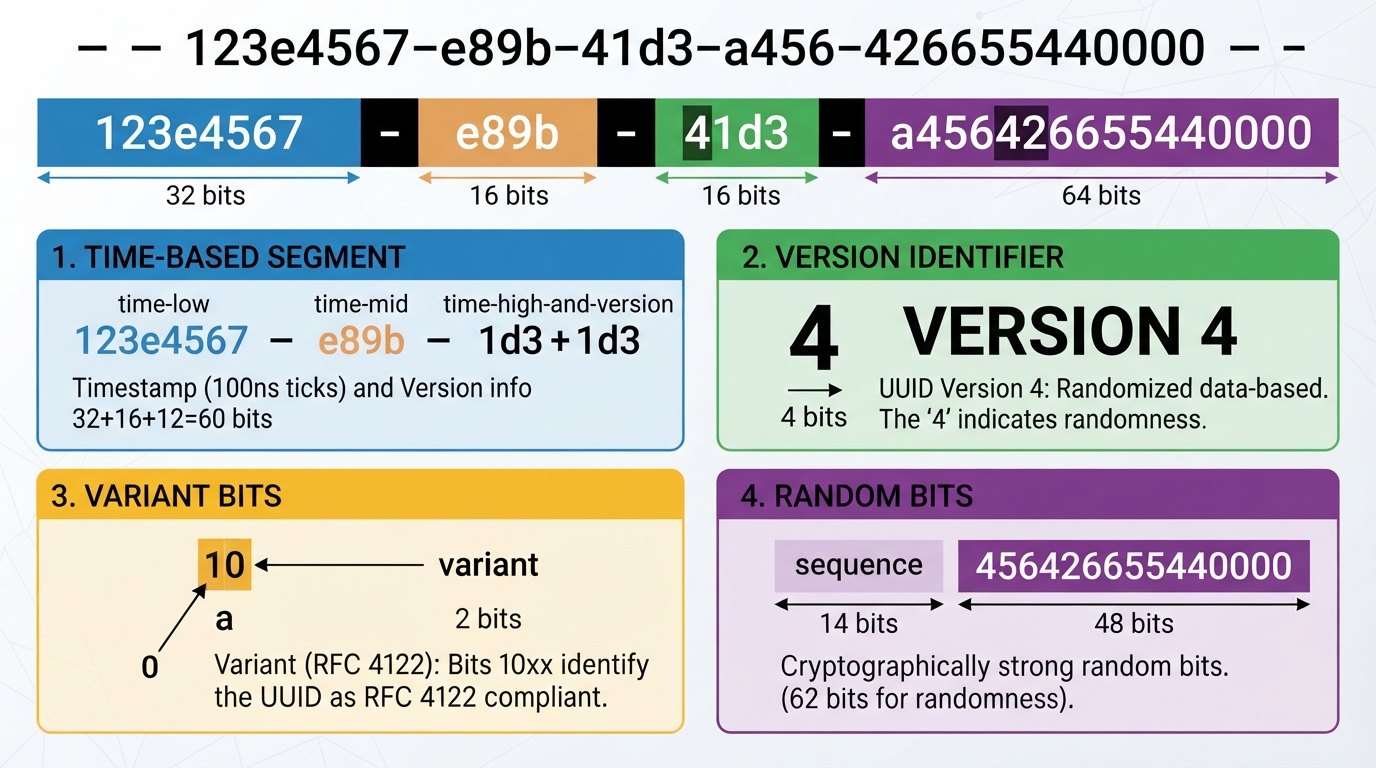
UUID stands for Universally Unique Identifier. It is a 128-bit number standardized by the Internet Engineering Task Force in RFC 9562 (updated from the classic RFC 4122). The canonical string representation is 36 characters — 32 hexadecimal digits grouped as 8-4-4-4-12, separated by hyphens:
550e8400-e29b-41d4-a716-446655440000
The format breaks down as:
- 8 characters — time-low
- 4 characters — time-mid
- 4 characters — version and time-high
- 4 characters — variant and clock sequence
- 12 characters — node (random or MAC-based)
Microsoft's implementation of UUIDs is called GUID (Globally Unique Identifier). For all practical purposes, UUID and GUID are interchangeable — they use the same format, the same generation algorithms, and the same 128-bit structure. The OKemall UUID Generator produces standard UUID v4 strings that work as GUIDs in any Microsoft environment.
The key property of a UUID is uniqueness without coordination. Unlike auto-incrementing database IDs, you do not need a central authority to issue UUIDs. Any system, anywhere, can generate a UUID independently, and the probability of collision with any other UUID ever generated anywhere else is negligible — approximately 1 in 2.71 × 10¹⁸ for UUID v4, which roughly translates to generating 1 billion UUIDs per second for 85 years before you have a 50% chance of a single collision.
UUID Versions: Why v4 Is the Default
There are 8 UUID versions defined (v1 through v8), each using a different method to generate the 128-bit value. The OKemall UUID Generator uses version 4 — the random variant — which is the most commonly used version in modern software development.
UUID v1 (Time-based): Generated from the current timestamp plus the machine's MAC address. Guarantees uniqueness as long as clock synchronization is maintained and MAC addresses are unique. Downside: it reveals when and on which machine the UUID was generated — a privacy concern.
UUID v2 (DCE Security): Similar to v1 but includes POSIX UID/GID fields in place of some timestamp bits. Rarely used outside of specific DCE (Distributed Computing Environment) applications.
UUID v3 (Name-based, MD5): Generated by hashing a namespace UUID plus a name string using MD5. Deterministic — the same namespace and name always produce the same UUID. Useful when you need a reproducible unique identifier.
UUID v4 (Random): Generated from 122 random bits (plus 6 bits reserved for version and variant). This is what the OKemall UUID Generator produces. The randomness comes from the server's cryptographically secure random number generator, ensuring both uniqueness and unpredictability.
UUID v5 (Name-based, SHA-1): Identical to v3 but uses SHA-1 hashing instead of MD5. Also deterministic. Preferred over v3 when collision resistance against the hashing algorithm matters.
UUID v6, v7, v8 (New in RFC 9562): Newer revisions designed for specific use cases. v6 reorders v1's timestamp fields for better database index performance. v7 uses a Unix timestamp with random bits for time-ordered, database-friendly UUIDs. v8 is a free-form variant for custom implementations.
Why v4 is the standard choice: v4 UUIDs reveal nothing — no timestamp, no machine identifier, no namespace. They are pure randomness, making them ideal for public-facing identifiers (API keys, session tokens, URL slugs), privacy-sensitive data, and distributed systems where coordination is undesirable or impossible.
Real-World Uses for UUIDs
1. Database Primary Keys. UUIDs are increasingly preferred over auto-incrementing integers for primary keys in distributed databases. When data is sharded across multiple database servers, integer IDs require coordination to prevent collisions, while UUIDs can be generated independently on every shard. PostgreSQL has a native UUID data type. MySQL supports UUIDs as CHAR(36) or BINARY(16). MongoDB uses a UUID-like ObjectId format by default.
2. API Resource Identifiers. REST APIs commonly use UUIDs in resource URLs — GET /api/users/550e8400-e29b-41d4-a716-446655440000. This prevents enumeration attacks (where an attacker increments an integer ID to discover other users) and does not reveal how many resources exist in the system.
3. Session Tokens and Authentication. Session IDs, CSRF tokens, password reset tokens, and API keys are often UUIDs. The cryptographic randomness of v4 UUIDs makes them suitable for security-sensitive tokens where unpredictability is critical.
4. File Naming. When accepting file uploads from users, UUID filenames prevent name collisions, path traversal attacks (../../../etc/passwd), and information leakage (original filenames may contain sensitive information).
5. Distributed Systems and Microservices. In a microservice architecture, different services need to generate IDs without communicating. UUIDs enable this — each service generates its own IDs independently, and they are guaranteed not to collide.
6. Idempotency Keys. Payment APIs (Stripe, PayPal) require idempotency keys to prevent duplicate charges. A UUID is the standard format for these keys — unique, random, and safe to retry.
7. Testing and Development. When writing tests, seeding databases, or building prototypes, you need unique values quickly. The OKemall UUID Generator gives you a new UUID with every click — no need to write a generator script, import a library, or type one manually.
How to Use the OKemall UUID Generator: Step-by-Step
Step 1: Open the tool. Navigate to okemall.com/uuid-generator. The page loads with a pre-generated UUID already displayed in the read-only input field — something like 90defba4-ea2a-4ef3-a141-333bf28f19dd. You can use this immediately or generate a new one.
Step 2: Click "Generate." Press the Generate button to produce a brand new UUID v4. The new UUID replaces the previous one in the display field. Each click produces a completely independent, cryptographically random identifier. Generate as many as you need — there is no limit.
Step 3: Copy to clipboard. Click the copy icon (two overlapping rectangles) next to the display field. The UUID is selected and copied to your clipboard. Paste it directly into your code editor, database query, API request, or configuration file.
What Makes OKemall's UUID Generator Stand Out
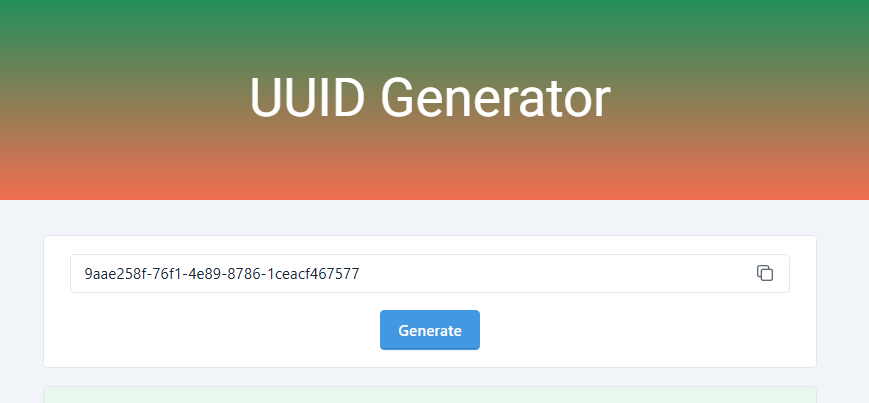
One-click operation. No settings to configure, no fields to fill, no decisions to make. Open the page and you already have a UUID. Click Generate for a new one. That is the entire workflow.
Pre-generated on page load. The tool initializes with a UUID already displayed. You can copy it immediately without even clicking Generate — helpful when you are in a rush and just need one identifier right now.
Copy-to-clipboard button. The dedicated copy button selects and copies the UUID with a single click. No manual text selection required.
Server-side generation for true randomness. UUIDs are generated server-side using cryptographically secure random number generation, not by JavaScript's Math.random() (which is not cryptographically suitable for UUID generation). This ensures compliance with RFC 9562 randomness requirements.
No registration, no limits. Generate one UUID or one thousand. No signup, no rate limiting, no restrictions.
Mobile-friendly and multi-language. Available on all devices, in 10 languages.
UUID vs Auto-Increment vs Other ID Strategies
| Strategy | Pros | Cons | Best For |
|---|---|---|---|
| Auto-increment integer | Simple, database-native, human-readable, good index performance | Reveals record count, predictable, requires coordination in distributed systems | Small monolithic applications, internal tools |
| UUID v4 | No coordination needed, unpredictable, privacy-preserving, distributed-friendly | Larger storage (16 bytes vs 4-8), less human-readable, slightly slower index performance | Distributed systems, public APIs, privacy-sensitive data |
| UUID v7 (timestamp-ordered) | Time-sortable, good index performance, distributed-friendly | Newer standard (RFC 9562, 2024), less library support currently | High-write databases, event sourcing, time-series data |
| Nano ID / short IDs | Short, URL-friendly, customizable alphabet | Not standardized, smaller collision margin than UUID | URL slugs, user-facing short links, public IDs |
Pro Tips for Using UUIDs
1. Store as binary, not text. Database storage for a UUID should use a native UUID type (16 bytes) or BINARY(16), not CHAR(36) (which stores 36 bytes of text plus hyphens). This saves over 50% storage and improves index performance.
2. Strip hyphens for compact storage. When you need the UUID in systems that do not support hyphens (some legacy systems, URL query strings), simply remove the four hyphens: 550e8400-e29b-41d4-a716-446655440000 → 550e8400e29b41d4a716446655440000.
3. Generate a batch for testing. Need 20 UUIDs for a test dataset? Click Generate 20 times, copying each one. Or generate one, copy it, modify one character, and repeat — the modified version is still a valid UUID for testing purposes (though it would not be RFC-compliant randomness).
4. Do not use in clustered primary keys. In databases like MySQL/InnoDB with clustered indexes, random UUIDs cause page splits and fragmentation. Use UUID v7 (timestamp-ordered) for clustered indexes, or pair UUIDs with a separate auto-increment key for the clustered index.
5. Pair with related OKemall tools. Use the Password Generator for authentication tokens, the UUID Generator for resource IDs, and the MD5 Generator for content hashing — three developer tools that belong in every bookmark folder.
Related OKemall Developer Tools
- URL Encode / URL Decode — Encode or decode UUIDs in URL query strings.
- Base64 Encode — Convert binary UUID representations to Base64 for JSON and API payloads.
- Password Generator — Generate secure passwords and tokens to pair with UUID-based resource IDs.
- MD5 Generator — Generate MD5 hashes (the hashing algorithm behind UUID v3).
- QR Code Generator — Encode UUIDs into QR codes for physical asset tracking.
- Javascript Beautifier — Format JavaScript code that generates or processes UUIDs.
- Word Counter — Count characters in UUID-bearing code and documentation.
Frequently Asked Questions
Q: Is the OKemall UUID Generator free? Yes, completely free. No signup, no limits.
Q: What version of UUID does the generator produce? Version 4 (random). The version identifier is always 4 at the 13th character position — e.g., ...-4xxx-....
Q: Can two generated UUIDs ever be the same? The probability of collision is approximately 1 in 2.71 × 10¹⁸ for UUID v4. For all practical purposes, the answer is no — you can safely assume every UUID generated is globally unique.
Q: Is the UUID generator cryptographically secure? Yes. UUIDs are generated server-side using a cryptographically secure random number generator, ensuring compliance with RFC 9562 randomness requirements.
Q: What is the difference between UUID and GUID? They are functionally identical. Microsoft uses the term GUID (Globally Unique Identifier) for the same 128-bit identifier format. The OKemall generator produces standard UUIDs that work as GUIDs in any Microsoft environment.
Q: Can I generate multiple UUIDs at once? The tool generates one UUID per click. For batch generation, click Generate, copy, and repeat as many times as needed.
Q: Does the tool work on mobile? Yes, fully responsive.
A UUID is one of those quietly essential pieces of infrastructure that developers rely on daily — for database keys, API resource IDs, session tokens, file names, idempotency keys, and a hundred other situations where you need a unique identifier that cannot collide with any other identifier generated anywhere else, by anyone else, ever.
The OKemall UUID Generator distills this capability into a single button. Open the page, and a fresh UUID v4 is already waiting. Click Generate for another. Click the copy icon. Paste it into your code. No libraries to import, no scripts to write, no configuration to manage — just the unique identifier you need, in the 36-character format every database, API, and framework expects.
Bookmark it alongside the Password Generator, URL Encoder, and MD5 Generator, and you have a developer toolkit that eliminates dozens of small but frequent friction points.
Stop writing UUID generation scripts. Try the OKemall UUID Generator now — one click, one UUID, ready when you are.