 English
 العربية
 Deutsch
 Español
 Français
 Italiano
 Português
 Русский
 Türkçe
 Tiếng Việt
OKemall UTM Builder — The Complete Guide to Creating Trackable Campaign URLs
Free UTM Builder — Create Trackable Campaign URLs for Google Analytics
You publish a blog post and share it on Facebook, Twitter, LinkedIn, your email newsletter, and a paid ad campaign. A week later, you open Google Analytics and see 2,000 visits. Great — but which channel sent the most traffic? Which campaign converted the best? Which social platform was worth your time and which was a waste?
Without UTM parameters, you cannot answer any of those questions. All 2,000 visits get lumped together as untraceable direct or referral traffic with no attribution to the specific campaign, channel, or piece of content that generated them.
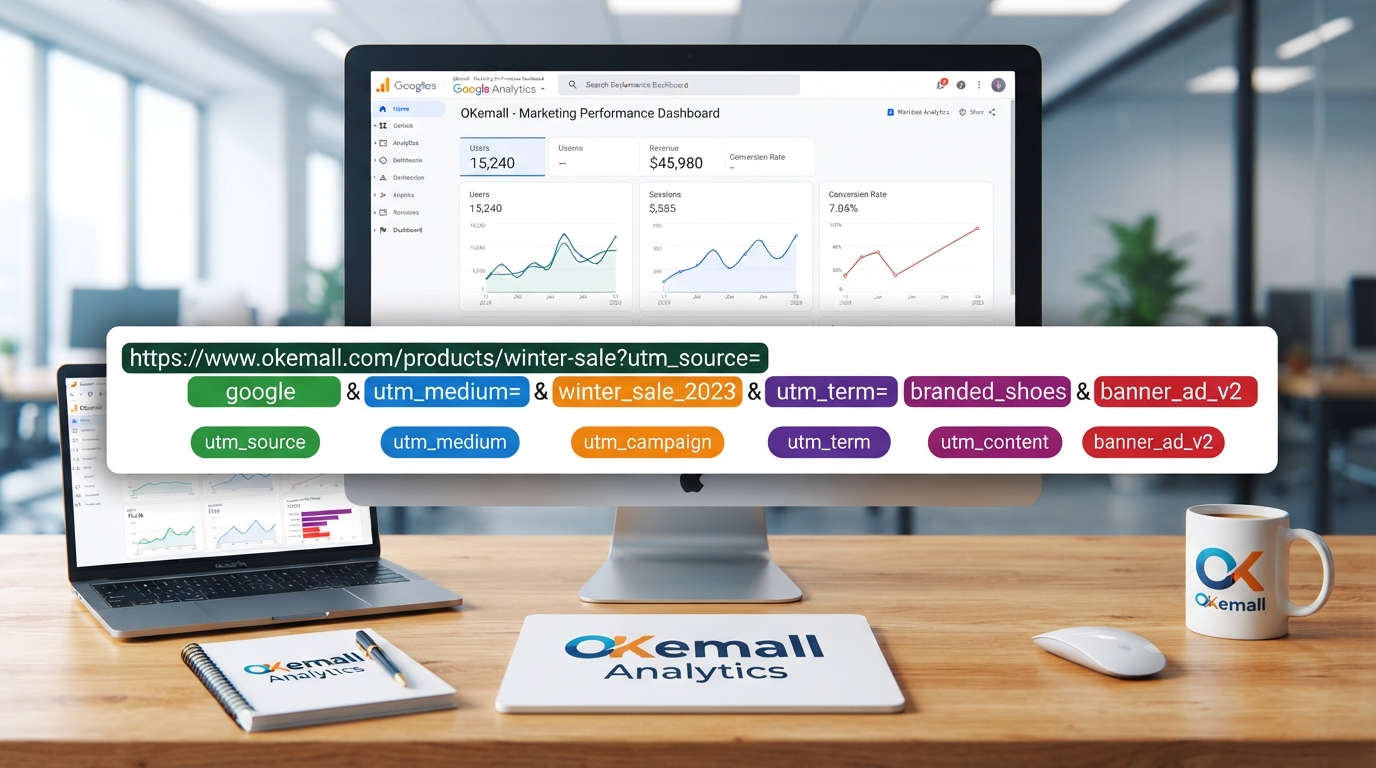
UTM parameters — short text tags appended to a URL — are the solution. They tell Google Analytics (and every other analytics platform) exactly where each visitor came from, through which channel, as part of which campaign, and in response to which specific piece of content. And building UTM-tagged URLs manually is tedious, error-prone, and inconsistent — which is exactly why the OKemall UTM Builder exists.
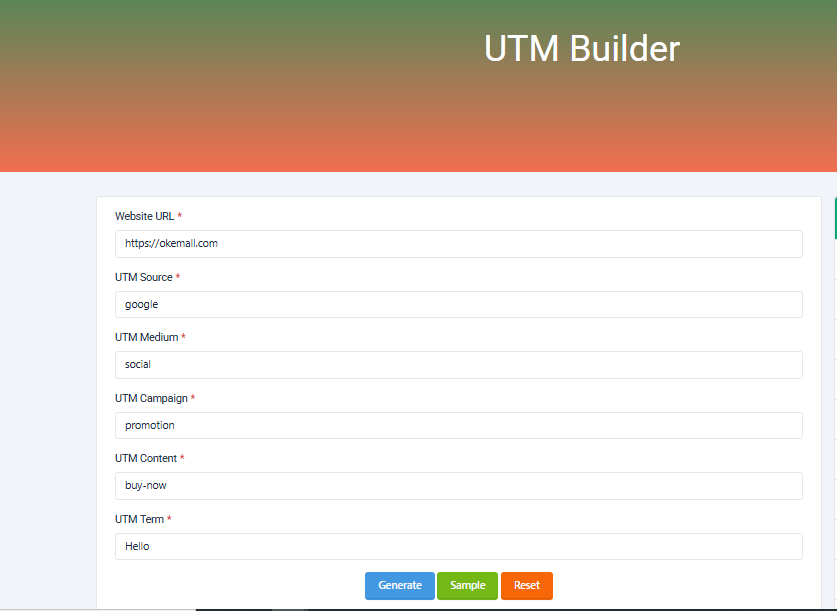
The OKemall UTM Builder turns five parameter fields plus a destination URL into a clean, copy-ready UTM-tagged link in seconds. No manual typing of ?utm_source= and &utm_medium=. No inconsistent naming conventions. No missing parameters. Just fill in the fields, click Generate, and copy the result.
In this guide, we will explore every UTM parameter, what each one tracks, naming conventions that make your analytics clean, and how to integrate the UTM Builder into your marketing workflow.
What Are UTM Parameters and Why Do They Matter?
UTM stands for Urchin Tracking Module — a legacy name from Urchin Software Corporation, the company Google acquired in 2005 to build what became Google Analytics. Despite the dated name, the technology remains the universal standard for campaign tracking across the web.
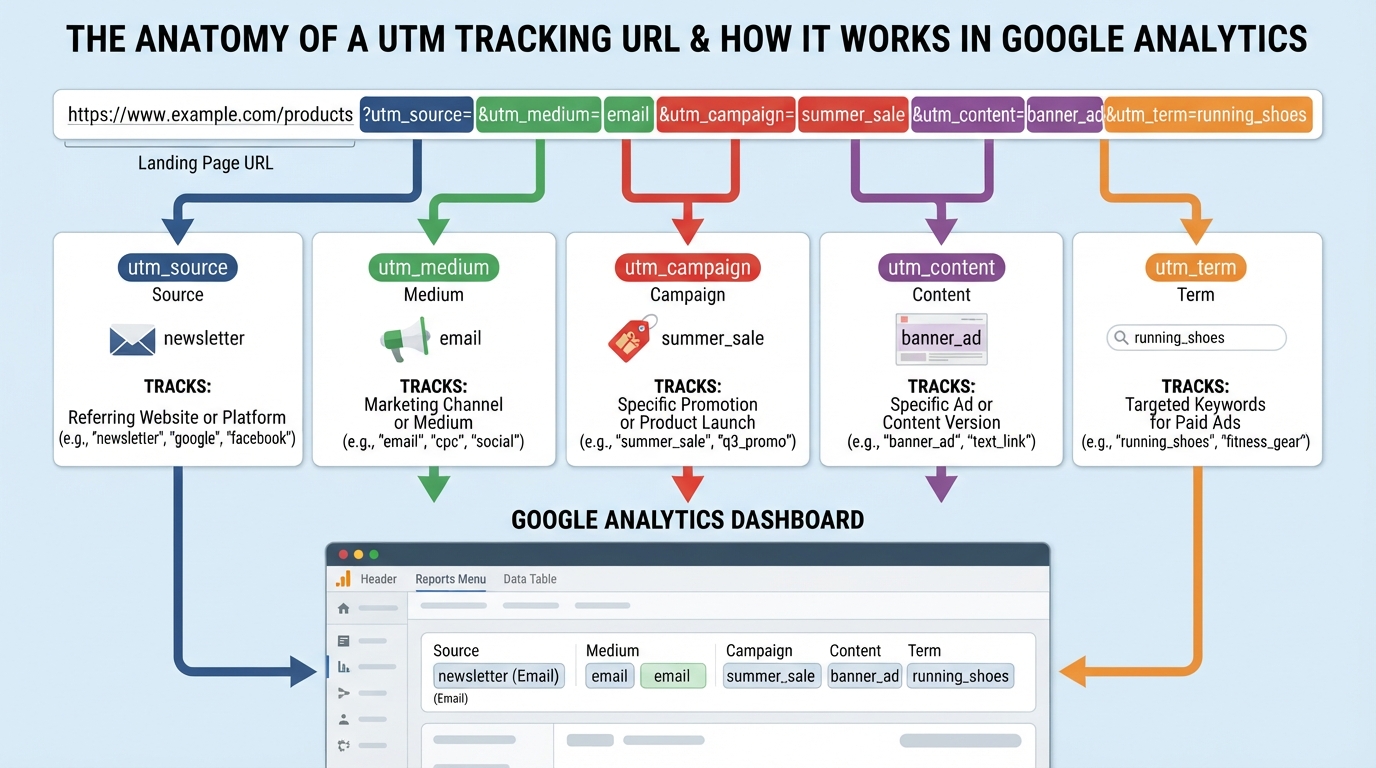
A UTM parameter is a short text string added to the end of a URL that passes attribution data to your analytics platform. Here is what a UTM-tagged URL looks like:
https://okemall.com/image-compressor?utm_source=newsletter&utm_medium=email&utm_campaign=product_launch_july
When someone clicks this link, Google Analytics records that the visit came from the newsletter source via the email medium as part of the product_launch_july campaign. Without the UTM tags, the same visit would show up as "direct" or uncategorized referral traffic — useless for attribution.
Five things UTM parameters give you that raw URLs do not:
- Channel attribution — Know exactly which platform (Facebook, email, Google Ads) sent each visitor.
- Campaign performance — Compare the ROI of your summer sale campaign versus your holiday campaign.
- Content-level tracking — See which version of an ad or which specific link placement drove the click.
- Paid keyword tracking — Identify which search terms your paid ads matched against.
- Consistent naming — A tool-enforced naming convention prevents the analytics chaos of
facebook,Facebook,fb, andsocialall appearing as separate sources.
The Five UTM Parameters Explained
The OKemall UTM Builder requires all six fields (URL + five parameters). Here is what each one does and how to use it correctly:
1. Website URL (Base URL)
What it is: The destination page you are sending traffic to. This is the actual page URL before any UTM tags are appended.
Example: https://okemall.com/image-compressor
Best practice: Use the full, canonical URL including https://. Do not include existing query parameters unless you are intentionally stacking UTM tags on top of them (which the builder handles correctly).
2. utm_source (Required)
What it tracks: The platform, website, or specific sender that generated the traffic.
Examples: facebook, twitter, newsletter, google, linkedin, partner_site
Best practice: Use lowercase, consistent naming. Pick one name per source and stick to it forever. facebook should always be facebook — never Facebook, FB, or social. This consistency is what makes your analytics reports clean and comparable.
3. utm_medium (Required)
What it tracks: The marketing channel or mechanism — how the link was delivered.
Examples: cpc (cost per click / paid ads), email, social, organic, referral, banner, affiliate
Best practice: Use the standard medium names that Google Analytics recognizes natively: cpc, email, organic, referral, social, display, affiliate. Custom mediums work but do not map to default channel groupings, making your reports harder to navigate.
4. utm_campaign (Required)
What it tracks: The specific marketing campaign or promotion the link belongs to.
Examples: summer_sale_2026, product_launch_july, black_friday, newsletter_weekly_42
Best practice: Use descriptive, date-stamped campaign names. summer_sale_2026 is infinitely better than sale — a year from now, you will know exactly which campaign the data refers to. Use underscores or hyphens, not spaces.
5. utm_content (Required)
What it tracks: Differentiates between versions of the same ad, link placement, or call-to-action within a single campaign.
Examples: header_button, sidebar_banner, footer_link, ad_version_a, ad_version_b, blue_cta
Best practice: Use utm_content for A/B testing and placement tracking. When you run two versions of an ad in the same campaign, tag one with utm_content=version_a and the other with utm_content=version_b. Google Analytics will show you exactly which version drove more clicks and conversions.
6. utm_term (Required)
What it tracks: The search keyword that triggered a paid search ad. Primarily used for Google Ads and other paid search campaigns.
Examples: running+shoes, image+compressor, free+pdf+tools
Best practice: For paid search campaigns, pass the keyword dynamically through your ad platform rather than hardcoding it. The UTM Builder lets you type it manually for quick links, but for production paid campaigns, your ad platform should auto-populate utm_term with the matched keyword.
How to Use the OKemall UTM Builder: Step-by-Step
Step 1: Enter the destination URL. Type the full web address — including https:// — into the Website URL field. This is the page you want people to land on.
Step 2: Fill in the five UTM fields. All six fields are required:
- UTM Source — Where the traffic is coming from (e.g.,
facebook,newsletter). - UTM Medium — The channel type (e.g.,
social,email,cpc). - UTM Campaign — The campaign name (e.g.,
summer_sale_2026). - UTM Content — The specific ad or link version (e.g.,
header_cta,version_a). - UTM Term — The keyword for paid search (e.g.,
running+shoes).
Step 3: Click "Generate." The tool constructs a complete UTM-tagged URL using your inputs and displays the result.
Step 4: Copy the URL. Use the copy-to-clipboard button to grab the full URL. Paste it into your social media post, email newsletter, ad platform, or wherever you are publishing the link.
Step 5 (optional): Use Sample to see an example workflow, or Reset to clear all fields.
UTM Naming Conventions That Keep Your Analytics Clean
The single biggest UTM mistake — bigger than forgetting a parameter — is inconsistent naming. Here is a naming convention system that keeps analytics reports readable:
Source names: Always lowercase, always consistent.
- ✅
facebook,twitter,linkedin,newsletter,google,bing - ❌
Facebook,FB,fb_ads,social
Medium names: Use standard Google Analytics mediums wherever possible.
- ✅
cpc,email,social,organic,referral,display,affiliate - ❌
paid,mail,smm,friend
Campaign names: Descriptive, date-stamped, no spaces.
- ✅
summer_sale_2026,black_friday_nov,product_launch_v2 - ❌
sale,campaign1,test
Content and Term: Specific, machine-readable.
- ✅
hero_banner,sidebar_widget,version_a,running+shoes - ❌
link,ad,stuff
Pro tip: Document your naming conventions in a shared document or spreadsheet. Every team member who creates UTM links should follow the same conventions. The UTM Builder helps by giving you consistent fields — your team discipline handles the rest.
What Makes OKemall's UTM Builder Stand Out
All five UTM parameters in one form. Unlike basic builders that only include source, medium, and campaign, the OKemall tool requires all five parameters plus the destination URL — ensuring you never forget utm_content or utm_term when you need them.
Structured, required fields. Every field is required. You cannot accidentally generate an incomplete UTM-tagged URL. This enforced completeness prevents the most common UTM error: missing parameters.
Copy-to-clipboard output. Click the copy button and paste directly into your social media scheduler, email platform, or ad manager.
Sample button for quick demonstration. See exactly how the output looks without entering real data — useful for training team members.
No registration required. Open the page, fill in fields, copy the URL. No signup, no limits.
Mobile-friendly. Build UTM links from your phone while scheduling social media posts on the go.
Multi-language support. Available in 10 languages.
How UTM Data Appears in Google Analytics
Once your UTM-tagged links are live and generating traffic, here is where to find the data:
In Universal Analytics (GA3): Acquisition → Campaigns → All Campaigns. Filter by source, medium, or campaign name. Compare conversion rates and goal completions across campaigns.
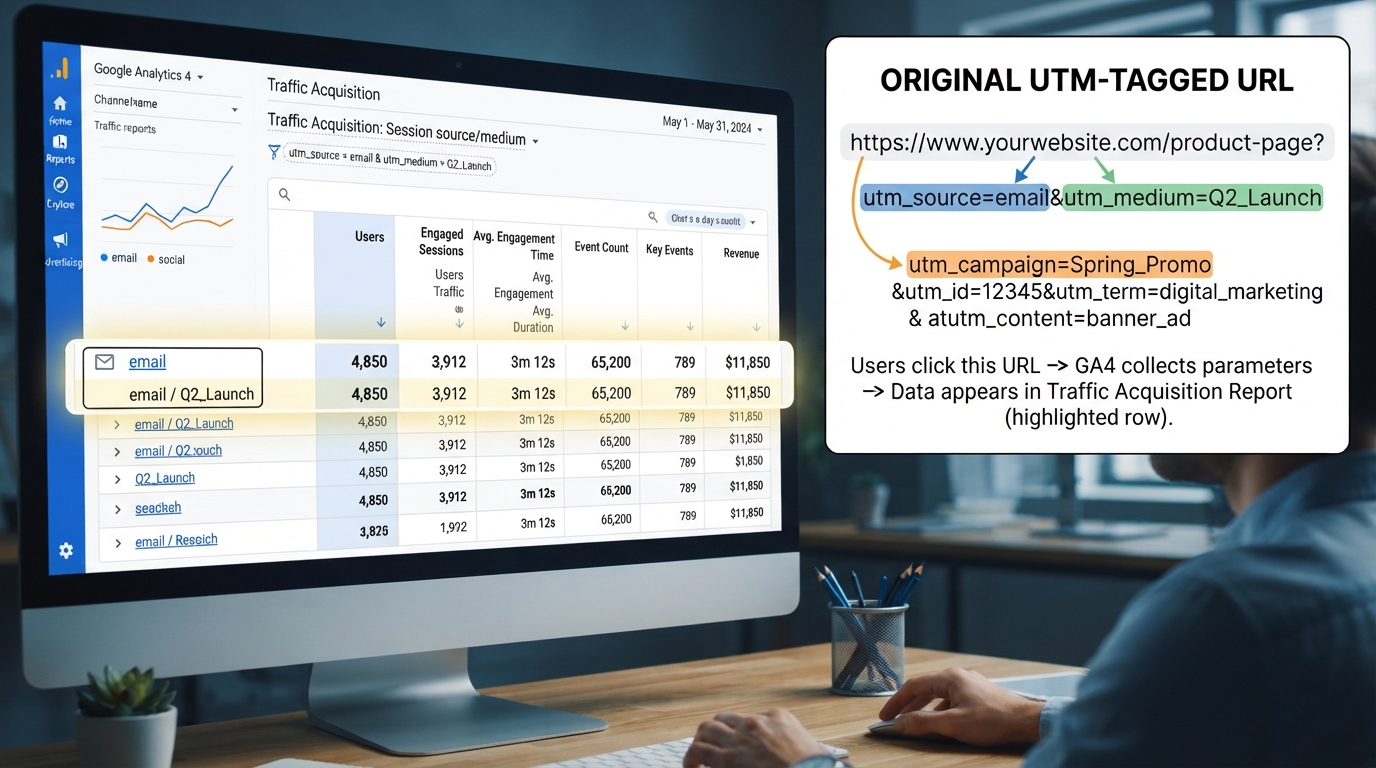
In Google Analytics 4 (GA4): Reports → Acquisition → Traffic Acquisition. UTM-tagged traffic appears under the source/medium dimension. Use the Explorations feature for deeper campaign-level analysis.
What you can measure: Sessions, users, bounce rate, average session duration, goal completions (or conversions in GA4), revenue, and e-commerce transactions — all segmented by source, medium, campaign, content, and term.
Pro Tips for UTM Link Management
1. Build UTM links BEFORE you need them. Create all campaign URLs during the planning phase, not five minutes before publishing. The UTM Builder makes this fast — generate, copy, and paste into your content calendar or campaign brief.
2. Use a URL shortener for social media. The full UTM-tagged URL can be long and ugly. Use a URL shortener (Bitly, Rebrandly, or your own branded short domain) to create a clean, shareable version that redirects to the full UTM-tagged URL. The UTM parameters survive the redirect.
3. Never use UTM parameters for internal links. UTM tags are for external traffic sources only — social media, email, ads, partner sites. Using them on internal links (navigation menus, related post links, site footer) resets the user's session and inflates your traffic counts with fake new sessions.
4. Test every UTM link before launching. Generate your UTM URL, paste it into a browser, and verify that the destination page loads correctly. Then check that the UTM parameters appear in the address bar. A broken UTM link in a paid ad campaign costs you money.
5. Keep a UTM log. Maintain a spreadsheet of every UTM-tagged URL you create with columns for URL, source, medium, campaign, content, term, creation date, and the campaign it belongs to. Six months from now, you will thank yourself.
6. Pair with URL encoding tools. If any of your UTM values contain special characters (spaces, ampersands, question marks), use the URL Encode tool to ensure the URL is valid. The UTM Builder handles standard values, but complex strings may need encoding.
Related OKemall URL and Analytics Tools
- URL Parser — Deconstruct any URL (including UTM-tagged ones) into its components for troubleshooting.
- URL Encode / URL Decode — Encode or decode special characters in URLs.
- QR Code Generator — Turn your UTM-tagged URLs into scannable QR codes for print and signage campaigns.
- Text to Slug — Create clean, URL-friendly slugs for your campaign names.
- Discount Calculator — Calculate the actual cost of your paid campaigns after discounts.
Frequently Asked Questions
Q: Is the OKemall UTM Builder free? Yes, completely free. No signup, no limits.
Q: Do UTM parameters work with platforms other than Google Analytics? Yes. UTM parameters are a universal standard. They work with Adobe Analytics, Matomo, Mixpanel, HubSpot, and virtually every analytics platform. Any tool that reads URL query parameters can parse UTM data.
Q: Are all five UTM parameters required? Technically, Google Analytics requires only utm_source to properly attribute traffic. However, the OKemall UTM Builder requires all fields because incomplete UTM tagging is the single most common analytics mistake. Fill in every field for complete data.
Q: What happens if I leave utm_content or utm_term blank when I do not need them? Enter a placeholder like none or general. This keeps your analytics reports clean — blank parameters create inconsistencies that make filtering and segmentation harder.
Q: Can UTM parameters be used in email campaigns? Absolutely. Email is one of the most common use cases. Tag newsletter links with utm_source=newsletter&utm_medium=email&utm_campaign=weekly_digest for precise email attribution.
Q: Do UTM parameters affect SEO? No. Google ignores UTM parameters for ranking purposes. However, using the canonical tag correctly prevents duplicate content issues if the same page is accessible with and without UTM tags.
Q: Does the tool work on mobile? Yes, the interface is fully responsive.
Marketing without attribution is guesswork. You spend time and money on social media posts, email campaigns, paid ads, and partner promotions — and without UTM parameters, you have no idea which efforts are actually driving results. Everything blends together in Google Analytics as untraceable noise.
The OKemall UTM Builder turns attribution from an afterthought into a habit. Six fields — URL, source, medium, campaign, content, and term — produce a complete, standards-compliant UTM-tagged link in seconds. Fill in the fields, click Generate, copy the URL, and publish. Every click from that link forward will carry full attribution data directly into your analytics reports.
Adopt consistent naming conventions. Build UTM links during campaign planning, not during campaign publishing. Test every link before it goes live. And use the UTM Builder as the single source of truth for every tracked URL your team creates.
Start tracking your marketing. Try the OKemall UTM Builder now — free, instant, and the foundation of every marketing attribution strategy.