Number to Word Converter Online: Convert Numbers into Words
Convert Numbers into Words Online
Writing numbers in words sounds simple until the numbers become large, contain decimals, or need to be used in formal documents. Typing a long number manually can introduce spelling mistakes, misplaced commas, or incorrect wording.
A Number to Word Converter solves that problem by turning numerical values into written words in seconds. Instead of manually converting a number such as 1250 into “one thousand two hundred fifty,” you can enter the number and let an online converter handle the wording.
OKemall’s Number to Word Converter provides a simple way to perform this type of conversion directly in a web browser. The tool is part of the platform’s collection of online conversion utilities. (OKemall Website Tools)
Whether you are preparing documents, checking written amounts, working with financial information, creating educational materials, or simply need to understand how a number is written, a number-to-words tool can save time and reduce avoidable errors.
What Is a Number to Word Converter?
A Number to Word Converter is an online tool that changes numerical values into their written form.
For example:
| Number | Written Form |
|---|---|
| 5 | Five |
| 18 | Eighteen |
| 42 | Forty-two |
| 100 | One hundred |
| 250 | Two hundred fifty |
| 1,000 | One thousand |
| 10,500 | Ten thousand five hundred |
| 125,000 | One hundred twenty-five thousand |
| 1,000,000 | One million |
The basic idea is straightforward: enter a number, select or activate the conversion function, and receive the equivalent wording.
This is particularly useful when the written form needs to be copied into another document instead of calculated manually.
Real-World Takeaway: If you regularly write invoices, financial documents, forms, educational material, or formal records, converting numbers automatically can eliminate a surprisingly common source of typing errors.
Why Convert Numbers to Words?
Numbers are efficient for calculations and compact data entry. Words, however, are often easier to use in formal writing.
Consider the difference between:
Amount: 25,750
and:
Amount: Twenty-five thousand seven hundred fifty
The numerical version is faster to read when performing calculations. The written version can be useful when a document requires an amount to be spelled out.
Common reasons for converting numbers to words include:
-
Preparing financial documents
-
Writing amounts on forms
-
Creating invoices and receipts
-
Preparing educational worksheets
-
Generating reports
-
Writing formal documents
-
Checking number spelling
-
Creating legal or administrative paperwork
-
Developing applications that display numbers as words
-
Teaching students how numbers are written
A converter is especially helpful when the number contains several digits and manually spelling it out would take longer.
How to Use a Number to Word Converter
The process is usually simple.
Step 1: Open the Number to Word Converter
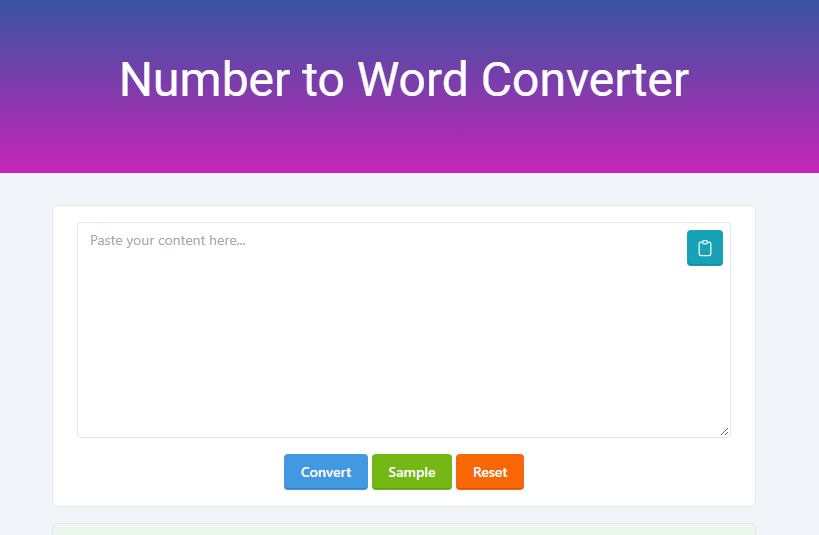
Open the Number to Word Converter on OKemall. The current page provides the conversion interface with options including Convert, Sample, and Reset. (OKemall Website Tools)
Step 2: Enter the Number
Type or paste the numerical value you want to convert.
For example:
9876
Step 3: Convert the Number
Use the conversion function to generate the written representation.
The result should provide the number in words rather than requiring you to manually construct each part.
Step 4: Review the Result
Before copying the result into an important document, check the number against the original value.
This is a good habit when working with invoices, financial records, official forms, or other documents where accuracy matters.
Step 5: Copy the Written Number
Once you have verified the result, copy the text wherever you need it.
The entire process can take only a few seconds.
Number to Words Examples
Understanding a few examples makes the conversion process easier.
Small Numbers
Small numbers are straightforward:
-
1→ One -
7→ Seven -
12→ Twelve -
25→ Twenty-five -
50→ Fifty -
99→ Ninety-nine
Numbers from 21 through 99 can require particular attention because compound numbers are generally written with a hyphen.
For example:
48 → Forty-eight
rather than treating the number as two independent words.
Hundreds
Numbers containing hundreds follow another pattern:
-
100→ One hundred -
105→ One hundred five -
250→ Two hundred fifty -
375→ Three hundred seventy-five -
999→ Nine hundred ninety-nine
A converter becomes more useful as the number grows because the structure becomes harder to construct manually.
Thousands
Thousands introduce another grouping level:
-
1,000→ One thousand -
2,500→ Two thousand five hundred -
10,000→ Ten thousand -
25,750→ Twenty-five thousand seven hundred fifty -
100,000→ One hundred thousand
Large numbers are where automated conversion becomes particularly convenient.
Millions
For million-level values:
-
1,000,000→ One million -
2,500,000→ Two million five hundred thousand -
10,000,000→ Ten million -
125,000,000→ One hundred twenty-five million
The exact wording style can vary depending on regional English conventions, so always consider the style required by the document you are preparing.
Number to Word Converter for Money
One of the most common reasons people search for a number-to-words tool is to write monetary amounts.
For example:
5,250
can be expressed as:
Five thousand two hundred fifty
A financial document may need an amount displayed both numerically and in words:
Amount: 5,250
In words: Five thousand two hundred fifty
This can make documents easier to verify and can provide an additional written representation of the amount.
For currency-specific documents, however, the currency name and decimal treatment should be reviewed separately.
For example, 1250.50 might need to be expressed according to the conventions of the relevant currency and document type rather than simply treated as an ordinary whole number.
Real-World Takeaway: For financial documents, use the converter to produce the wording, but verify the currency, decimal portion, and final amount before submitting or signing anything.
Number to Words for Invoices and Receipts
Invoices frequently contain several numerical values:
-
Invoice number
-
Quantity
-
Unit price
-
Subtotal
-
Tax
-
Discount
-
Total amount
The final payable amount is sometimes displayed in both numeric and written form.
For example:
Total: 48,500
Amount in words: Forty-eight thousand five hundred
This can make the document easier for another person to review.
A number-to-word converter can also help when preparing repeated documents because you do not have to manually spell every amount.
Number to Words for Cheques and Formal Documents
Written amounts can also appear in formal financial or administrative paperwork.
The goal is usually to make the amount unambiguous.
For example:
75,000
becomes:
Seventy-five thousand
When an amount is being used in an official document, accuracy matters more than speed. Always compare the converted wording against the original numerical amount.
Do not assume that an automated conversion replaces the need for review.
Number to Word Converter for Students
Students can use number-to-word tools as a learning aid.
For example, a learner can enter:
6,482
and study the resulting structure:
Six thousand four hundred eighty-two
This can help learners understand:
-
Ones
-
Tens
-
Hundreds
-
Thousands
-
Larger number groups
-
Number spelling
-
Place value
-
Compound numbers
Teachers and parents can also use number conversion exercises to create practice activities.
For example:
Write 3,750 in words.
Answer:
Three thousand seven hundred fifty
A converter can then be used to check the result.
The best educational use is not simply copying the answer. Students can first attempt the conversion themselves and use the tool as a verification method.
Understanding Place Value
Number-to-word conversion becomes much easier when you understand place value.
Consider:
4,582,731
Break it into groups:
4 | 582 | 731
These groups represent:
-
Millions
-
Thousands
-
Units
The number can then be constructed from those groups.
This is why large numbers are easier to process when separated into groups of three digits.
| Place | Example |
|---|---|
| Ones | 7 |
| Tens | 70 |
| Hundreds | 700 |
| Thousands | 7,000 |
| Ten thousands | 70,000 |
| Hundred thousands | 700,000 |
| Millions | 7,000,000 |
A number-to-word converter performs this type of structural interpretation automatically.
Why Manual Conversion Can Be Error-Prone
Writing small numbers manually is easy.
Large numbers are different.
Consider:
784,206,519
There are several parts to process:
-
784 million
-
206 thousand
-
519
A single omitted word or incorrectly interpreted group can change the result.
Common manual mistakes include:
-
Misreading digit groups
-
Forgetting a place-value term
-
Misspelling number words
-
Incorrectly handling compound numbers
-
Mixing regional spelling conventions
-
Misreading large values
-
Copying the wrong number before conversion
Automation does not remove the need for checking, but it reduces the amount of manual work involved.
Number to Word Converter vs Manual Conversion
| Factor | Online Converter | Manual Conversion |
|---|---|---|
| Speed | Very fast | Slower for large numbers |
| Large numbers | Convenient | More difficult |
| Typing effort | Low | High |
| Spelling assistance | Yes | No |
| Repeated conversions | Efficient | Time-consuming |
| Learning value | Useful for checking | Strong for practice |
| Verification | Easy | Requires self-checking |
For occasional small numbers, manual conversion may be perfectly reasonable.
For long numbers or repeated work, an online converter is usually more convenient.
Common Number Formatting Issues
Before converting a number, make sure you know what the digits represent.
For example:
1,000,000
is one million.
But the same sequence can become confusing if commas are used inconsistently.
Some regions and software systems use different conventions for decimal and thousands separators.
A number such as:
1,234.56
may represent one thousand two hundred thirty-four point fifty-six in one formatting convention.
When working with international documents, always confirm the number format before converting it.
Whole Numbers vs Decimal Numbers
Whole numbers are generally the simplest numbers to convert into words.
Examples include:
-
15
-
250
-
4,500
-
75,000
-
1,000,000
Decimal numbers require additional attention because the part after the decimal point may need to be expressed according to the purpose of the document.
For example:
12.50
could be interpreted differently depending on whether it represents:
-
A mathematical value
-
A monetary amount
-
A measurement
-
A percentage-related value
This is why you should not treat every decimal conversion as a simple spelling exercise.
International Numbering Conventions
English-speaking regions do not always use exactly the same conventions for number wording.
For example, British English commonly uses “and” in certain number constructions, while American English often omits it.
A number such as 125 may therefore appear as:
One hundred twenty-five
or:
One hundred and twenty-five
Both conventions can be encountered in English-language documents.
This matters when preparing content for a particular country, organization, school, or publication.
If a document has an established style guide, follow that style rather than mixing conventions.
Common Mistakes When Converting Numbers to Words
1. Entering the wrong number
The converter can only work with the value you provide.
If you accidentally enter 52,000 instead of 520,000, the written result will also be wrong.
2. Ignoring decimal values
Do not assume that a decimal amount should be handled exactly like a whole number.
Check what the decimal represents before using the result.
3. Mixing English conventions
Avoid switching between American and British number-writing styles within the same document unless the context requires it.
4. Skipping verification
For important documents, compare the original number with the converted wording.
5. Treating conversion as financial validation
A number-to-word converter changes the representation of a value. It does not determine whether the value itself is correct.
For example, if an invoice total is wrong, converting that wrong total into words does not fix the calculation.
Who Can Benefit from a Number to Word Converter?
The tool can be useful for a wide range of users.
Students
Students can practice number spelling and place-value concepts.
Teachers
Teachers can create exercises and verify written-number answers.
Accountants and Office Staff
Financial and administrative workers may need written amounts for documents and records.
Business Owners
Business owners can use written amounts in invoices, quotations, receipts, and other paperwork.
Developers
Developers building financial or document-generation applications may need to understand how numerical values can be represented as text.
Writers and Editors
Writers may occasionally need to spell out numbers according to a publication's style guide.
Everyday Users
Anyone who needs to quickly understand or write a large number can use a converter instead of doing the conversion manually.
How Accurate Is a Number to Word Converter?
A properly implemented converter can be highly useful for standard numerical input, but accuracy should always be considered in context.
The biggest practical issue is often not the conversion algorithm itself. It is the input.
If you enter the wrong number, the converter will produce a correctly formatted representation of the wrong value.
For important documents, use this simple verification process:
-
Check the original number.
-
Convert it.
-
Read the written result.
-
Compare the major place-value groups.
-
Confirm the final wording matches the intended amount.
-
Check currency or decimal conventions if applicable.
That takes very little time and can prevent costly document errors.
Number to Word Converter for Developers
Number-to-word conversion is also a useful programming concept.
Applications often store numerical values but need to display them as human-readable text.
Common examples include:
-
Invoice systems
-
Accounting software
-
Payment applications
-
Document generators
-
Education platforms
-
Reporting systems
-
Receipt generators
-
Financial applications
A developer may store:
24500
but generate:
Twenty-four thousand five hundred
for a document.
This is particularly useful when generating PDFs, invoices, receipts, certificates, or other documents automatically.
Number to Word vs Word to Number
These are related but opposite tasks.
Number to Word
12,500 → Twelve thousand five hundred
Word to Number
Twelve thousand five hundred → 12,500
The first converts numerical data into language.
The second interprets written language as a numerical value.
Both can be useful, but they solve different problems.
OKemall also includes other converter tools in its collection, including Number to Roman Numerals and Roman Numerals to Number. (OKemall Website Tools)
Quick Reference: Number to Words
| Numeric Value | Example Written Form |
|---|---|
| 10 | Ten |
| 25 | Twenty-five |
| 100 | One hundred |
| 500 | Five hundred |
| 1,000 | One thousand |
| 2,500 | Two thousand five hundred |
| 10,000 | Ten thousand |
| 25,000 | Twenty-five thousand |
| 100,000 | One hundred thousand |
| 1,000,000 | One million |
| 10,000,000 | Ten million |
| 100,000,000 | One hundred million |
| 1,000,000,000 | One billion |
The table is useful as a quick reference, but an online converter becomes more practical when the values become longer or need to be converted repeatedly.
Best Practices for Using a Number to Word Converter
A few simple habits can make the process more reliable.
Check the input first
Make sure every digit is correct before clicking Convert.
Keep the original number nearby
When reviewing the output, compare it with the original numerical value.
Use consistent formatting
If you are preparing a professional document, follow its required number and language conventions.
Review financial amounts carefully
Currency symbols, decimal values, and written amounts should all agree.
Use the tool as a verification aid
For educational work, try converting the number yourself first. Then use the converter to check your answer.
Avoid unnecessary manual editing
If the converter produces the correct result, copying the output directly reduces the chance of introducing a new typo.
Frequently Asked Questions
What is a Number to Word Converter?
A Number to Word Converter is an online utility that transforms numerical values into their written form. For example, 500 can be represented as “Five hundred.”
How do I convert numbers into words online?
Enter the numerical value into a number-to-word conversion tool and use its conversion function. The tool generates the corresponding written form.
Can I convert large numbers into words?
Yes. Number-to-word tools are particularly useful for large values because manually spelling them becomes more difficult as the number of digits increases.
Can I use a number-to-word converter for money?
Yes, it can help generate the written representation of a monetary amount. However, currency names, decimal portions, and regional formatting should be checked separately.
Is a number-to-word converter useful for students?
Yes. Students can use it to check number spelling, place value, and written-number exercises.
Why should I convert a number into words?
Written numbers can be useful in formal documents, financial records, invoices, receipts, educational materials, reports, and other situations where a numerical value needs a text representation.
Is “one hundred twenty-five” different from “one hundred and twenty-five”?
They reflect different English conventions. American English commonly omits “and” in this construction, while British English often includes it.
Can a number-to-word converter replace manual checking?
For important documents, you should still verify the result. The converter processes the number you enter, so an incorrect input will produce an incorrect result.
What is the difference between Number to Word and Word to Number?
Number to Word changes a numerical value into written language. Word to Number performs the reverse process by turning written number expressions into numerical values.
Final Thoughts
Converting numbers into words is a small task that can become surprisingly time-consuming when the values are large or need to be processed repeatedly.
A Number to Word Converter provides a practical shortcut. Instead of manually breaking a number into hundreds, thousands, millions, and larger place-value groups, you can generate the written representation quickly and then verify it against the original value.
The tool is useful for students, teachers, office workers, business owners, writers, developers, and anyone who occasionally needs to write numerical values in words.
For everyday conversions, the biggest advantage is simple: less manual work and fewer opportunities for spelling or place-value mistakes.
When the output will appear in an important financial, legal, academic, or business document, take a few seconds to check the result before using it.

Popular Tools
Recent Posts