Text to Slug: What It Is, How URL Slugs Work and How to Create Better SEO-Friendly URLs
A URL can reveal a lot before a visitor opens the page.
Compare these two addresses:
example.com/blog/how-to-build-a-website
and
example.com/page?id=84729
The first is readable. The second is not.
That difference is where a text to slug converter becomes useful. A slug turns an ordinary title, phrase, or sentence into a cleaner URL component by removing or transforming characters that don't belong in a practical web address.
For bloggers, developers, SEO professionals, ecommerce managers, content teams and anyone publishing web pages, this is a small task with surprisingly broad consequences.
A good slug is short. Descriptive. Consistent.
It can make a URL easier for people to understand, easier to copy, easier to share and easier to maintain across a website.
Google's own documentation recommends readable, descriptive URLs and specifically recommends using hyphens to separate words rather than underscores.
What Is a Text to Slug Converter?
A text to slug converter is a tool that transforms normal text into a URL-friendly string, commonly called a slug.
For example:
Input
How to Create a Website in 2026
Slug
how-to-create-a-website-in-2026
Another example:
Input
Free Image Compressor & Resizer
Slug
free-image-compressor-resizer
The exact transformation rules can vary between tools and platforms, but the goal is generally the same: produce a compact string suitable for use inside a URL.
A slug isn't the entire URL.
Consider:
https://example.com/blog/website-speed-guide
The complete URL is everything beginning with https://.
The slug is:
website-speed-guide
That distinction matters when discussing SEO, website architecture, CMS settings and redirects.
Why Are URL Slugs Important?
A slug is only one component of SEO. It isn't a magic ranking mechanism.
But URL structure still matters.
Google recommends creating logical, intelligible URL structures and using descriptive words instead of unreadable identifiers. Google also notes that URL words can help users understand what a page is about and may appear as part of breadcrumbs in search results.
Consider:
example.com/blog/seo-url-structure
versus:
example.com/blog/post-49281
The first communicates context immediately.
A visitor can infer the subject without opening the page.
That's useful for humans, too. Clean URLs are easier to recognize in browser history, messages, documents, presentations and internal workflows.
Real-World Takeaway: Don't create a slug merely because an SEO checklist says you should. Create it because a human should be able to look at the URL and understand what page they're about to open.
How Does Text to Slug Conversion Work?
A typical slug conversion process follows several basic transformations.
Suppose the original title is:
The Best Web Design Tools for Beginners!
A converter may process it roughly like this:
-
Convert uppercase letters to lowercase.
-
Remove unnecessary punctuation.
-
Replace spaces with hyphens.
-
Remove unsupported or unwanted symbols.
-
Collapse repeated separators.
-
Trim hyphens from the beginning and end.
The resulting slug becomes:
the-best-web-design-tools-for-beginners
The process looks simple.
The details matter.
A production website also has to consider Unicode characters, accented letters, duplicate slugs, reserved URL characters, existing URLs, CMS rules and redirects.
Text to Slug Examples
| Original Text | URL Slug |
|---|---|
| How to Start a Blog | how-to-start-a-blog |
| Best WordPress Plugins in 2026 | best-wordpress-plugins-in-2026 |
| Free Image Compressor | free-image-compressor |
| 10 Tips for Better SEO! | 10-tips-for-better-seo |
| Website Design & Development | website-design-development |
| What's a URL Slug? | whats-a-url-slug |
| SEO-Friendly URLs: A Practical Guide | seo-friendly-urls-a-practical-guide |
The objective isn't to preserve every character.
It's to preserve the useful meaning.
What Makes a Good URL Slug?
A strong slug generally has five characteristics: descriptive, readable, concise, consistent and stable.
1. Descriptive
The slug should communicate the page topic.
Good:
/wordpress-speed-optimization
Less useful:
/article-17
A descriptive path gives both users and systems more context.
2. Readable
Humans should be able to scan the words naturally.
Prefer:
/website-security-guide
over:
/website_security_guide
Google specifically recommends hyphens as word separators and advises against underscores for this purpose.
3. Concise
A slug doesn't need to repeat the entire article title.
For example:
Title
The Complete Beginner's Guide to Understanding Website Speed Optimization
Possible slug:
website-speed-optimization-guide
The shorter version preserves the central subject without turning the URL into a sentence.
4. Consistent
A website should follow a recognizable URL convention.
If one article uses:
/seo-guide
another uses:
/SEO_Guide_2026
and another uses:
/seo-guide-final-version
the site becomes harder to maintain.
Consistency reduces unnecessary complexity.
5. Stable
Changing a published URL isn't something to do casually.
If a page already has backlinks, bookmarks, shares, search visibility, or internal links, changing its URL can create additional work. A proper redirect may be needed so visitors and search engines reach the new address.
Google also recommends minimizing alternative URLs that return the same content.
Hyphens vs. Underscores in URLs
This question comes up constantly.
For normal word separation, use hyphens.
Recommended:
/digital-marketing-guide
Less suitable:
/digital_marketing_guide
Google explicitly recommends hyphens (-) instead of underscores (_) when separating words in URLs.
This isn't just about appearance.
Hyphens create a familiar visual convention for readable web addresses and align with Google's documented URL guidance.
Should Slugs Be Lowercase?
Generally, yes.
A lowercase convention produces cleaner, more predictable URLs:
/text-to-slug
rather than:
/Text-To-Slug
or:
/TEXT-TO-SLUG
There's also a technical reason to be careful here: URLs are case-sensitive under the relevant web standards and Google notes that /APPLE and /apple can be treated as distinct URLs. If a server treats them identically, Google recommends using consistent casing.
Lowercase slugs are therefore a sensible site-wide convention.
Should You Remove Stop Words?
Words such as "a," "the," "of," "to," and "for" are often called stop words.
Should they always disappear?
No.
There's no universal requirement that every slug remove them.
For example:
/how-to-use-wordpress
is perfectly readable.
You might shorten it to:
/use-wordpress
if that better represents the page.
The decision should be based on clarity, not an obsession with removing every short word.
A readable URL is usually more useful than an artificially compressed one.
Should Your Main Keyword Be in the Slug?
When it naturally describes the page, including the primary topic in the slug can make sense.
For a page targeting text to slug, a logical URL might be:
/text-to-slug
rather than:
/online-tool-17
But don't force keywords into every URL.
Google's guidance emphasizes descriptive URLs rather than keyword stuffing. A URL should describe the actual page.
If an article is about image compression, this is sensible:
/image-compression-guide
This is not:
/best-image-compression-image-compressor-free-image-compression-tool
The second version is difficult to read and unnecessarily repetitive.
Do Long Slugs Hurt SEO?
Length alone isn't a simple ranking switch.
The bigger concern is unnecessary complexity.
Compare:
/seo
with:
/complete-beginners-guide-to-understanding-everything-about-search-engine-optimization
The second URL might accurately describe a long article, but it could probably be shortened without losing useful context.
A practical slug should contain the words necessary to identify the subject.
Nothing more.
Google recommends simple, descriptive URL structures and advises shortening URLs by removing unnecessary parameters where possible.
Text to Slug for WordPress
WordPress automatically creates URL slugs from page and post titles, but manual editing is still useful.
Imagine your post title is:
15 Powerful Ways to Improve Your Website's Loading Speed
WordPress might initially generate something close to:
15-powerful-ways-to-improve-your-websites-loading-speed
You could decide that:
website-loading-speed
better represents the page.
That decision should be made before the URL becomes widely established.
If the URL is already published and receiving traffic, don't change it simply to make it shorter. The potential cleanup benefit may not justify the migration work.
When a URL must change, configure the appropriate redirect and update important internal references.
Text to Slug for Developers
Developers often need slug generation inside applications rather than through a browser-based tool.
A typical algorithm might look like:
Input:
"Hello, World! This Is a Test"

Normalize:
"hello, world! this is a test"

Remove punctuation:
"hello world this is a test"

Replace whitespace:
"hello-world-this-is-a-test"

Final slug:
"hello-world-this-is-a-test"
Production systems need additional safeguards.
For example, two different titles may produce the same slug:
How to Build a Website
and
How to Build a Website!
Both can become:
how-to-build-a-website
A database-backed application therefore needs a strategy for uniqueness.
Possible approaches include:
how-to-build-a-website
how-to-build-a-website-2
or another application-specific identifier.
The important point is that slug generation and slug uniqueness are separate problems.
Unicode and Non-English Text
International websites make slug generation more complicated.
Google recommends using words in the audience's language where appropriate and explains that non-ASCII characters may require percent encoding in URLs.
For an English-language website, ASCII lowercase slugs with hyphens are often the simplest operational choice.
For multilingual sites, however, automatically stripping every non-English character can destroy meaning.
A developer should decide whether to:
-
Preserve language-specific characters.
-
Transliterate them.
-
Generate language-specific slugs.
-
Use an ASCII representation.
-
Apply a consistent localization policy.
There is no single rule that fits every international website.
Should You Use Numbers in Slugs?
Numbers aren't inherently bad.
For example:
/wordpress-6-guide
or:
/seo-trends-2026
can be perfectly reasonable.
The problem comes when numbers are meaningless:
/post-48291
A descriptive phrase generally provides more context than an arbitrary database ID.
Google recommends readable words instead of long or unreadable identifiers in URLs.
Should You Include the Year?
It depends on the content.
For genuinely year-specific content:
/seo-trends-2026
makes sense.
For an evergreen guide:
/how-to-improve-website-speed
may be more durable.
Year-based URLs can create a maintenance issue when the article is updated annually. A publisher needs to decide whether the URL should remain stable or whether each year's content deserves a separate page.
Changing an established URL only because its year is outdated can create unnecessary redirects and link-management work.
Think about content lifecycle before publishing.
Text to Slug vs. URL Encoder
These tools solve different problems.
A slug generator creates a readable identifier intended for a URL path.
A URL encoder converts characters into a representation suitable for URL transmission.
Example:
Text:
hello world
Slug:
hello-world
URL encoding:
hello%20world
They're not interchangeable.
A slug is usually designed for readability and content organization. URL encoding is concerned with representing characters safely within a URL.
OKemall places Text to Slug alongside URL-related tools such as URL Encode, URL Decode and URL Parser, which reflects these different jobs.
Text to Slug vs. Case Converter
A case converter changes capitalization.
For example:
HELLO WORLD
might become:
hello world
A slug converter goes further:
HELLO WORLD!
becomes:
hello-world
The second process deals with URL-oriented formatting rather than capitalization alone.
For content workflows, both tools can be useful at different stages.
How to Create a Good Slug Manually
You don't always need a generator.
For a simple page, use this workflow:
Step 1: Identify the page topic
Ask what the page is actually about.
Step 2: Remove unnecessary wording
Keep the core concepts.
Step 3: Convert to lowercase
Use a consistent casing convention.
Step 4: Replace spaces with hyphens
Use - between words.
Step 5: Remove unnecessary punctuation
Question marks, quotation marks, commas and similar characters generally don't belong in a simple slug.
Step 6: Check the final URL
Read it as if you're seeing it for the first time.
Does it make sense?
If not, revise it.
Real-World Takeaway: Write the slug for a person who has never seen the page. If they can predict the subject from the URL alone, you've probably chosen the right level of detail.
How to Use OKemall Text to Slug
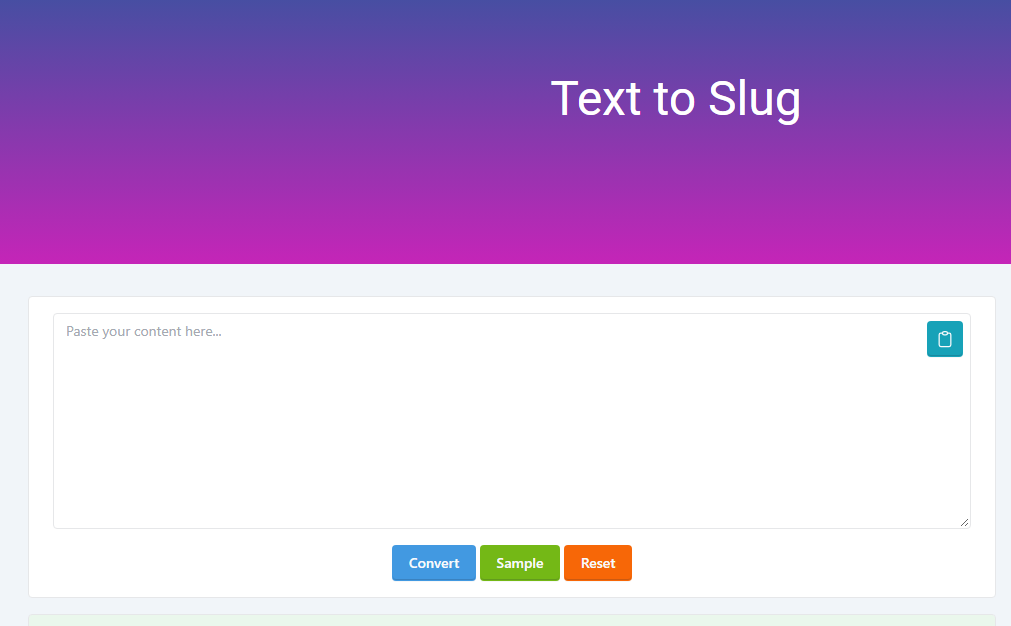
The OKemall Text to Slug tool is designed specifically for converting text into slug-style URL text. The page provides a simple conversion interface with controls for converting, using a sample and resetting the input.
A straightforward workflow is:
-
Open the Text to Slug tool.
-
Enter or paste your title or phrase.
-
Run the conversion.
-
Review the generated slug.
-
Copy it into your CMS, website, application, or content workflow.
-
Check the resulting URL before publishing.
The final human review still matters.
A converter can format text.
It cannot know your site's information architecture, URL history, redirect strategy, or content lifecycle.
When a Text to Slug Tool Saves Time
Manual conversion takes only a few seconds.
Do it hundreds of times and the seconds accumulate.
Content teams may create dozens of articles every month. Developers may need consistent slugs while preparing test data. Ecommerce teams may handle hundreds or thousands of product names.
A dedicated converter reduces repetitive formatting.
It also reduces small mistakes such as:
-
Leaving spaces in a URL.
-
Mixing uppercase and lowercase.
-
Using underscores inconsistently.
-
Leaving punctuation in the path.
-
Creating repeated hyphens.
-
Forgetting to remove unnecessary symbols.
The value isn't complexity.
It's consistency at scale.
Common Slug Mistakes
Keyword stuffing
Don't turn the slug into a list of search terms.
Bad:
/free-best-seo-tool-seo-tools-seo-tool-online
Better:
/free-seo-tool
Random identifiers
Avoid meaningless paths when descriptive words are available.
Bad:
/page/58391
Better:
/seo-audit-guide
Changing established URLs casually
A shorter slug isn't automatically worth changing a live URL.
URL changes can affect bookmarks, external links, internal links, redirects and indexing.
Using inconsistent separators
Choose one convention.
For standard word separation, Google's guidance favors hyphens.
Adding unnecessary dates
Don't insert a publication year simply because many blogs do.
Use it when the date is part of the content's identity.
Creating duplicate slugs
Different titles can normalize to the same string.
Your CMS or application needs to handle that collision.
URL Slugs and Site Architecture
A slug is not your entire information architecture.
That's a critical distinction.
Google explains that its systems use links between pages to understand site structure and relative importance; URL structure alone isn't how Google determines the complete hierarchy of a site.
Suppose you have:
/seo/technical-seo
and
/seo/on-page-seo
Those URLs provide useful context.
But internal linking still matters.
If your technical SEO page is never linked from relevant pages, the directory structure itself won't magically establish its importance.
A strong website combines readable URLs with logical navigation and relevant internal links.
Slugs for Ecommerce Websites
Ecommerce websites face an additional challenge: scale.
A store may have thousands of products, categories, filters, variants and sorting combinations.
Google recommends descriptive URL paths for ecommerce pages and warns that unnecessary URL variations can create crawling and indexing complications.
A product URL such as:
/products/black-running-shoes
communicates more than:
/products/23891
But product variants require careful URL planning.
Color, size, filters, sorting parameters and tracking parameters shouldn't be allowed to create an uncontrolled maze of near-duplicate URLs.
This is where slug strategy becomes part of technical SEO rather than a simple formatting task.
A Practical Slug Decision Framework
| Situation | Recommended Approach |
|---|---|
| New blog post | Create a short descriptive slug |
| Existing page with traffic | Avoid unnecessary changes |
| Product page | Use a descriptive product identifier |
| Evergreen guide | Avoid unnecessary year references |
| Annual report | Include the year when it defines the page |
| Multilingual website | Use a consistent language/slug policy |
| Developer application | Generate normalized, unique slugs |
| Ecommerce filters | Control URL variations carefully |
| Internal testing | Keep predictable naming conventions |
| Social sharing | Prefer readable, compact URLs |
Does a Good Slug Guarantee Better Rankings?
No.
That distinction is essential.
A clean slug can improve URL clarity, but it doesn't guarantee a first-page ranking.
Search visibility depends on many factors, including the usefulness and relevance of content, technical accessibility, links, site structure, search intent and Google's broader ranking systems.
Google's own SEO documentation frames descriptive URLs as part of good site organization rather than a standalone ranking shortcut.
Don't spend two hours rewriting a slug while ignoring a page's actual content.
The URL is part of the system.
It isn't the system.
A Professional Slug Checklist
Before publishing a page, check:
-
Is the slug descriptive?
-
Is it reasonably short?
-
Is it lowercase?
-
Are words separated with hyphens?
-
Does it accurately represent the page?
-
Have unnecessary words been removed?
-
Have unnecessary symbols been removed?
-
Is the primary topic clear?
-
Does it follow your site's existing URL convention?
-
Is the URL already in use?
-
If changing an existing URL, is a redirect required?
-
Are internal links updated?
-
Does the canonical URL match the intended version?
-
Does the URL work correctly in the browser?
-
Is the page accessible to search engines?
That final technical check matters.
Google notes that URL design affects crawling and indexing and recommends keeping URLs simple and crawlable.
The Bigger Lesson About Slugs
A slug looks tiny.
The decisions behind it aren't.
For a beginner, it makes a messy URL readable. For a content manager, it creates consistency. For a developer, it becomes part of routing and database design. For an SEO professional, it contributes to a logical, understandable site structure.
The best approach is therefore straightforward: describe the page accurately, remove unnecessary complexity, use consistent separators and casing and avoid changing established URLs without a clear reason.
When you need to turn ordinary text into that format quickly, a dedicated Text to Slug converter can remove the repetitive formatting work.
For a simple browser-based workflow, you can use OKemall's free Text to Slug tool to convert titles and phrases into clean slug-style text.
A good slug won't rescue weak content.
It will, however, make the address of that content easier to understand and that's a worthwhile standard for any serious website.

Popular Tools
Recent Posts