Remove Line Breaks: How to Clean, Reformat and Join Broken Text Online
Copying text from a PDF, email, website, spreadsheet, scanned document, or chat window can create an annoying problem: the words are correct, but the formatting is broken.
A paragraph that should occupy one continuous block may arrive with a hard line break after every few words. A document copied from a narrow PDF column can become dozens of short lines. Text pasted into a CMS may retain unwanted paragraph breaks, while data copied from a spreadsheet can contain invisible newline characters that interfere with processing.
That’s where a Remove Line Breaks tool becomes useful.
The basic job sounds simple: delete unwanted line breaks and turn fragmented text into clean, readable content. The real challenge is knowing which breaks should disappear and which ones should remain.
For ordinary prose, removing every newline can destroy paragraph structure. For a single-line field, however, keeping those breaks can make the text unusable. The right approach depends on where the text came from and where it needs to go.
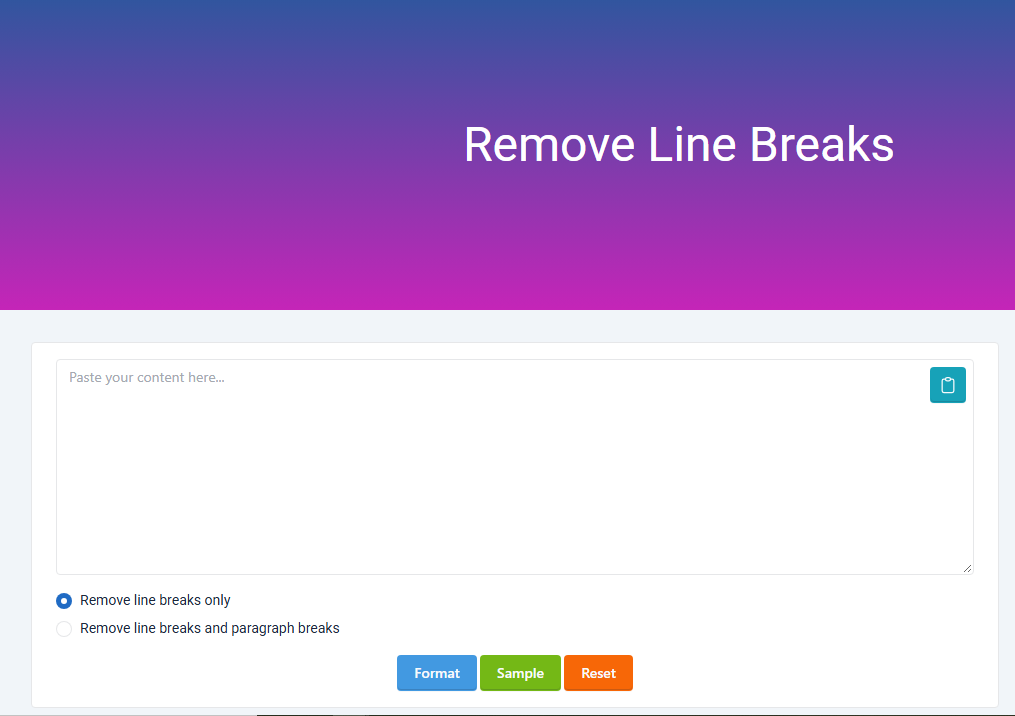
The OKemall Remove Line Breaks tool provides two basic formatting choices: remove line breaks while retaining paragraph structure, or remove both line and paragraph breaks.
Real-World Takeaway: Don't treat every newline as a mistake. A newline can represent a real paragraph, a list item, a data field, or merely the visual wrapping of a PDF. Good text cleaning starts by identifying which type you're dealing with.
What Does “Remove Line Breaks” Actually Mean?
A line break is a character or character sequence that tells a text system to start a new line.
Depending on the operating system and application, text can use different newline conventions. Windows commonly represents a new line with carriage return plus line feed (CRLF), while Unix-like systems commonly use line feed (LF). Older Mac systems used carriage return (CR).
To a reader, these differences are usually invisible.
To software, they can matter.
Consider this copied text:
Digital marketing helps businesses
reach customers through search,
social media, email, and other
online channels.
Visually, it may have originally been one paragraph. After copying it from a PDF, the line endings may become actual newline characters.
Removing those unwanted breaks produces:
Digital marketing helps businesses reach customers through search, social media, email, and other online channels.
The words haven't changed. Only the structure has.
That distinction matters because a line break is formatting data, not normally part of the sentence itself.
Why Text Gets Filled With Unwanted Line Breaks
The problem often starts before the text reaches your editor.
PDF documents
PDFs are designed to preserve visual layout. A paragraph displayed across a page may be internally represented according to its visual positioning rather than the logical paragraph structure a person sees.
When you copy the text, the receiving application may interpret visual line boundaries as actual line breaks.
A clean paragraph can therefore arrive looking like this:
A website's performance affects
how quickly visitors can interact
with its pages and features.
This is one of the most common reasons people search for a line break remover.
Emails
Email messages can also contain manually inserted line breaks, quoted replies, signatures, and formatting artifacts.
A message copied from an older email system may contain line endings that weren't intended to become visible paragraph boundaries in another application.
Web pages
Websites use HTML structure rather than plain-text newline characters to control most visual formatting.
Copying content from a webpage can therefore produce results that differ from what you see on screen.
Spreadsheets
Spreadsheets deserve special attention.
A cell can contain a deliberate line break inside the same cell. Removing it may be exactly what you want when exporting or transferring data, but it may also destroy meaningful information.
For example:
John Smith
Kathmandu
Nepal
could represent one person's address.
Flattening it to:
John Smith Kathmandu Nepal
may be useful for a search field but less useful for an address label.
Chat applications and messaging platforms
Messages copied from chat interfaces can contain line breaks created by formatting, pasted content, or manually separated sections.
This becomes particularly noticeable when transferring text into forms that expect one continuous value.
AI-generated or Markdown-formatted text
Text copied from content editors and chat interfaces may include headings, bullets, blank lines, and hard returns.
Removing line breaks can help when the destination requires plain text, but it shouldn't be confused with removing Markdown syntax or other formatting.
Those are separate cleanup tasks.
Remove Line Breaks vs. Remove Paragraph Breaks
This is the distinction that causes the most confusion.
A line break usually moves text to the next line.
A paragraph break separates one logical block of writing from another.
They aren't interchangeable.
Imagine:
Search engine optimization helps
websites become easier to discover.

Technical SEO focuses on the
site's underlying structure.
There are two paragraphs here.
If you remove the internal line breaks while preserving the paragraph boundary, you get:
Search engine optimization helps websites become easier to discover.

Technical SEO focuses on the site's underlying structure.
That's usually the desired result.
If you remove every break, you get:
Search engine optimization helps websites become easier to discover. Technical SEO focuses on the site's underlying structure.
That may be appropriate for a single-line input, but it's less readable as an article.
The OKemall tool exposes these as separate choices: “Remove line breaks only” and “Remove line breaks and paragraph breaks.”
Quick comparison
| Cleaning method | What it removes | Best use |
|---|---|---|
| Remove line breaks only | Unwanted breaks inside text | Articles, paragraphs, copied PDF text |
| Remove line + paragraph breaks | All newline structure | Single-line fields, compact data |
| Replace breaks with spaces | Newlines become spaces | Prose copied from documents |
| Preserve paragraph breaks | Keeps logical sections | Blog posts, reports, long documents |
| Remove blank lines only | Empty spacing between blocks | Cleaning lightly formatted text |
The important question isn't simply “How do I remove line breaks?”
It's “Which line breaks are actually unwanted?”
How to Remove Line Breaks Online With OKemall
For a quick cleanup, an online text-processing tool is often easier than manually editing every line.
The process is straightforward.
Step 1: Open the tool
Visit the OKemall Remove Line Breaks tool.
The page provides the text-cleaning interface and formatting options directly on the tool page.
Step 2: Paste your text
Copy the text containing unwanted line breaks and paste it into the input area.
For example:
The internet has changed
how companies communicate
with their customers.
Step 3: Select the appropriate mode
Use Remove line breaks only when you want to join broken lines while retaining meaningful paragraph separation.
Choose Remove line breaks and paragraph breaks when the entire text needs to become one continuous block.
Step 4: Review the result
Don't skip this step.
Automatic text cleanup can fix formatting, but it cannot always understand the semantic purpose of every newline.
Check:
-
Paragraph boundaries
-
Lists
-
Headings
-
Addresses
-
Tables
-
Code
-
Product information
-
Sentence spacing
-
Unusual punctuation
Step 5: Copy the cleaned text
Once the structure looks correct, copy the result into your document, CMS, form, spreadsheet, editor, or other destination.
The goal is not merely fewer line breaks. The goal is usable text.
A Practical Example: Cleaning PDF Text
Suppose you're preparing research notes from a PDF.
You copy:
Website speed affects user
experience and can influence
how visitors interact with
a page.
The visual PDF may have displayed those words as a normal paragraph.
After cleanup:
Website speed affects user experience and can influence how visitors interact with a page.
That's a straightforward correction.
Now consider a different example:
Key findings

Page speed improved.

Conversion rate increased.
If you remove every line break, you may end up with:
Key findings Page speed improved. Conversion rate increased.
The information survives, but the document's hierarchy disappears.
For reports, articles, presentations, and research notes, preserving paragraph structure is usually the safer choice.
Real-World Takeaway: If the text came from a PDF and every visual line has become a separate text line, preserve paragraph breaks whenever possible. Flattening the entire document can fix one problem while creating another.
When Should You Remove All Line Breaks?
There are situations where a single continuous line is exactly what you need.
Form fields
Some forms expect one-line input.
A multi-line value can cause validation errors or simply look awkward.
Search queries
A collection of keywords copied from a list may need to become one space-separated string.
Spreadsheet cells
If information has been copied from multiple lines and must be placed into a single cell or field, removing newlines can make the data easier to process.
Database imports
Certain import workflows expect one record or value per field.
An embedded newline can be interpreted as a new record or create malformed data if the import process isn't configured to handle multiline values.
URLs and identifiers
Some long strings may have been visually wrapped when copied.
A newline inserted into the middle of a URL, identifier, token, or reference value can make it unusable.
But there's an important distinction.
A URL copied across two visual lines might need its newline removed without adding a space.
For normal prose, replacing a line break with a space is often correct.
For an identifier, adding a space can corrupt the value.
When You Should Not Remove Line Breaks
Automatic cleanup isn't always beneficial.
Source code
Line breaks often represent structure.
Removing them can make code difficult to read and, depending on the language and syntax, may alter its behavior.
Poetry and lyrics
Line arrangement can be part of the content itself.
Flattening the lines changes the presentation and sometimes the meaning.
Addresses
A postal address often relies on multiple lines.
Removing those breaks may produce a technically readable string but a less useful address.
Lists
Consider:
SEO audit
Keyword research
Content planning
Technical optimization
Turning this into one paragraph destroys the list structure.
Tables
Copied table data can be particularly dangerous.
A newline may represent a row, a cell, or an intentionally separated value. A generic line-break remover doesn't necessarily know the difference.
Legal and business documents
Contracts, policies, invoices, and reports often use deliberate formatting.
Clean the text only when you understand what each structural break represents.
Remove Line Breaks With a Text Editor
You don't always need an online tool.
Modern text editors can often search for newline characters using regular expressions or special search patterns.
For example, a regular-expression workflow can identify newline characters and replace them with spaces.
The exact syntax varies by editor.
A conceptual replacement is:
Find:    newline
Replace: space
For more advanced cleanup, you may use rules such as:
one or more whitespace characters → single space
That can be useful when copied text contains a mixture of line breaks, tabs, and multiple spaces.
The drawback is precision.
A global replacement doesn't understand whether a newline represents a paragraph, list, address, or accidental wrapping.
Online tools can be more convenient for quick, isolated jobs because the interface exposes the intended cleanup mode without requiring regex knowledge.
Remove Line Breaks With Code
Developers frequently need to normalize text programmatically.
In JavaScript, a basic approach is:
const cleaned = text.replace(/\r?\n/g, ' ');
This converts Windows-style CRLF and Unix-style LF line endings into spaces.
If you want to normalize repeated whitespace as well:
const cleaned = text.replace(/\r?\n/g, ' ').replace(/\s+/g, ' ').trim();
Python offers a similar approach:
cleaned = text.replace('\r\n', '\n').replace('\r', '\n')
cleaned = cleaned.replace('\n', ' ')
The technical method is simple.
The hard part is deciding what the replacement should be.
Replacing a newline with nothing can join words incorrectly:
digital
marketing
becomes:
digitalmarketing
Replacing it with a space produces:
digital marketing
For ordinary prose, the second result is usually what you want.
Why Replacing a Line Break With a Space Matters
This is a small technical detail with large consequences.
Suppose copied text contains:
content
marketing
Deleting the newline produces:
contentmarketing
The original words are now merged.
Replacing the newline with a space produces:
content marketing
That preserves the word boundary.
However, not every newline should become a space.
Consider:
https://example.com/
products
Adding a space produces:
https://example.com/ products
which is not the same URL.
The correct cleanup strategy depends on the data.
Remove Line Breaks for SEO Content
Line breaks themselves aren't an SEO problem.
A common misconception is that removing line breaks somehow makes content more search-engine friendly.
It doesn't.
Google's guidance emphasizes useful, reliable, people-first content and warns against creating text primarily to manipulate search rankings. Google also states that there is no preferred word count that publishers should target simply for ranking purposes.
The purpose of removing unwanted line breaks is content usability and formatting, not ranking manipulation.
For a blog article, preserving logical paragraphs is usually better for readers than producing one enormous block of text.
For example, this:
Search optimization requires technical,
content, and authority considerations.
Each component supports a different
part of the search experience.
should generally become:
Search optimization requires technical, content, and authority considerations. Each component supports a different part of the search experience.
But separate paragraphs should remain separate.
Good formatting helps readers scan and understand the page.
That matters because the page's actual purpose should be served by its main content, and Google explicitly recognizes interactive tools as part of a webpage's main content when they directly fulfill the page's purpose.
Remove Line Breaks for Content Management Systems
CMS platforms can react differently to pasted formatting.
WordPress, for example, may interpret pasted content according to the editor and formatting source.
If copied text contains dozens of unnecessary line breaks, the resulting article can become visually fragmented.
A practical workflow is:
-
Copy the source text.
-
Clean accidental line breaks.
-
Preserve genuine paragraph boundaries.
-
Paste the cleaned text into the editor.
-
Inspect headings, lists, links, and spacing.
-
Publish only after checking the rendered page.
Don't assume that visually clean input guarantees a clean webpage.
Rich-text editors may carry additional markup that isn't visible in plain text.
Remove Line Breaks for Data Cleaning
Text cleanup becomes more technical when you're handling datasets.
Imagine a column containing:
Kathmandu
Nepal
If the target system expects a single location field, you may want:
Kathmandu, Nepal
Simply removing the newline isn't enough.
This is a key limitation of generic line-break removal: formatting cleanup isn't the same as data transformation.
A newline can contain structural meaning.
If you're processing customer records, addresses, product descriptions, survey responses, or exported data, define the intended output format before running a bulk replacement.
Real-World Takeaway: For large datasets, never perform a blind “remove all line breaks” operation on production data. Test it on a sample first and inspect records where newlines may carry meaning.
Common Mistakes When Removing Line Breaks
Mistake 1: Removing every newline
This is the fastest way to destroy paragraph structure.
Use an option that preserves paragraphs when the source is normal prose.
Mistake 2: Joining text without spaces
This can merge words together.
web + site is not the same as web site when the original newline separated the words.
Mistake 3: Treating line breaks and blank lines as identical
A single newline and multiple consecutive newlines can represent different structures.
Mistake 4: Cleaning code as if it were prose
Code has syntax and formatting rules.
A text cleaner isn't a code formatter.
Mistake 5: Not checking the output
Even simple transformations deserve a visual inspection when the source contains mixed content.
Mistake 6: Confusing line removal with text rewriting
A line-break remover should change formatting, not silently rewrite the author's wording.
That's especially important for professional documents, legal text, research material, and client content.
Online Tool vs. Manual Editing vs. Code
Different situations call for different approaches.
| Method | Best for | Advantage | Limitation |
|---|---|---|---|
| Online Remove Line Breaks tool | Quick one-off cleanup | Fast and simple | Less control than custom code |
| Text editor | Moderate text cleanup | Search and replace options | Requires knowing the editor |
| Regular expressions | Repeated technical cleanup | Highly flexible | Easy to create incorrect rules |
| JavaScript/Python | Automated workflows | Scalable and repeatable | Requires development knowledge |
| Manual editing | Small documents | Maximum control | Slow for large text |
For five lines of text, manual editing may be faster.
For 5,000 records, automation makes more sense.
For a copied article, a dedicated text-cleaning tool can be the practical middle ground.
A Better Workflow for Professional Teams
Senior managers and content teams often deal with text from multiple sources.
That creates a process problem rather than a simple formatting problem.
A reliable workflow looks like this:
1. Identify the source
Was the text copied from a PDF, email, spreadsheet, webpage, database, or application?
Source type often predicts the formatting problem.
2. Identify the destination
Will the cleaned text go into a blog CMS, spreadsheet, CRM, form, database, email, or code editor?
The destination determines how aggressive the cleanup should be.
3. Preserve meaningful structure
Keep paragraphs, lists, headings, and data fields unless there's a specific reason to flatten them.
4. Normalize spacing
After removing line breaks, check for duplicate spaces and accidental whitespace.
5. Validate the result
Search for merged words, broken URLs, missing paragraph boundaries, and altered list structures.
6. Automate only after testing
If the process happens repeatedly, write a script or standardize a workflow.
Automation should make a known process faster, not make an uncertain process faster.
Frequently Asked Questions
What is a line break?
A line break is a character or sequence of characters that causes text to start on a new line. Different operating systems and applications can represent line endings differently.
Why does copied PDF text have so many line breaks?
PDFs prioritize visual page layout. When text is extracted, visual line boundaries can sometimes be interpreted as actual newline characters, causing paragraphs to appear fragmented.
Can I remove line breaks without removing paragraphs?
Yes. That is often the preferred approach for normal prose. Keep paragraph boundaries while removing accidental breaks inside individual paragraphs.
Should I replace line breaks with spaces?
For ordinary prose, usually yes. A space prevents two words separated by a newline from being joined together.
Can removing line breaks damage text?
Yes, if the breaks contain meaningful structure. Lists, addresses, poetry, code, tables, and formatted documents can lose important information.
Is removing line breaks useful for SEO?
It can improve the readability and usability of copied content, but removing line breaks by itself doesn't create an SEO advantage. The goal should be clean, useful content for readers.
Can developers remove line breaks with JavaScript?
Yes. JavaScript's string replacement functions can detect newline characters and replace them with spaces, empty strings, or another separator depending on the application's requirements.
Can I remove line breaks from multiple paragraphs?
Yes, but choose the mode carefully. If you want readable prose, remove accidental internal line breaks while retaining paragraph boundaries.
What is the difference between a line break and a paragraph break?
A line break moves text to another line. A paragraph break separates distinct blocks of writing. They may be represented by different patterns depending on the application.
Is an online line-break remover useful for PDF text?
Yes. It can be particularly useful when copied PDF text contains hard breaks at the end of every visual line. You should still inspect the output for headings, lists, tables, and other structures.
Final Practical Checklist
Before you copy cleaned text into a document or publishing system, check these seven things:
-
Words: Are any words accidentally joined?
-
Spaces: Did each replacement preserve appropriate spacing?
-
Paragraphs: Are meaningful paragraph boundaries still present?
-
Lists: Are bullets and numbered items intact?
-
Links: Are URLs still valid?
-
Data: Did any newline represent a real field or record?
-
Formatting: Does the final text match the purpose of the destination?
A good line-break cleanup should be almost invisible.
The reader shouldn't notice the transformation. They should simply see text that reads naturally and fits the format in which it is being used.
For a quick cleanup of copied or fragmented text, use the OKemall Remove Line Breaks tool, select the formatting mode that matches your content, review the output, and then copy the cleaned text into your destination. The tool's current interface distinguishes between removing line breaks alone and removing both line and paragraph breaks, which gives you control over how much structure is preserved.

Popular Tools
Recent Posts