 English
 العربية
 Deutsch
 Español
 Français
 Italiano
 Português
 Русский
 Türkçe
 Tiếng Việt

OKemall Time Converter — The Ultimate Guide to Converting Time Units Onlin
Introduction
Time is the one measurement we all deal with every single day — yet its units remain surprisingly frustrating to convert. How many seconds are in 3.7 hours? How many milliseconds in 2 weeks? How many days in 18 months? These questions come up constantly in programming, project management, scientific calculations, travel planning, and even everyday cooking.
The reason time conversion is awkward is that time units do not follow a clean decimal system. Minutes have 60 seconds. Hours have 60 minutes. Days have 24 hours. Weeks have 7 days. Months have 28 to 31 days. Years have 365 or 366 days. There is no single multiplier that covers them all, which makes mental arithmetic unreliable and error-prone.
The OKemall Time Converter eliminates this complexity entirely. It converts any value between 12 time units — from picoseconds to years — with a single click. No mental math, no memorizing conversion factors, no risk of errors.
In this guide, we will explore every time unit the tool supports, real-world scenarios where accurate time conversion matters, and how to make the OKemall Time Converter your go-to resource.
Why Time Conversion Is Harder Than It Looks
On the surface, time conversion seems simple. But the irregular relationships between units create constant pitfalls:
- Non-decimal relationships. Unlike length (1 m = 100 cm) or weight (1 kg = 1000 g), time uses irregular multipliers: 60, 24, 7, and variable month lengths. You cannot simply move a decimal point.
- Inconsistent month and year lengths. Converting 90 days to months depends on which months you count. Converting days to years must account for leap years. Precision-sensitive fields cannot afford approximations.
- Extreme scale differences. A nanosecond (10⁻⁹ seconds) and a year (31,536,000 seconds) span 16 orders of magnitude. Converting between extremes manually invites misplacing zeros.
- Mixed-unit inputs. Real-world time often comes in compound form: 2 hours 45 minutes 30 seconds. Breaking this into a single unit before conversion adds another layer of complexity.
An online time converter handles all four of these challenges automatically. You enter a single number, choose the source unit, and get accurate results across every other unit — no compound breaking, no multiplier memorization, no rounding errors.

The 12 Time Units Explained
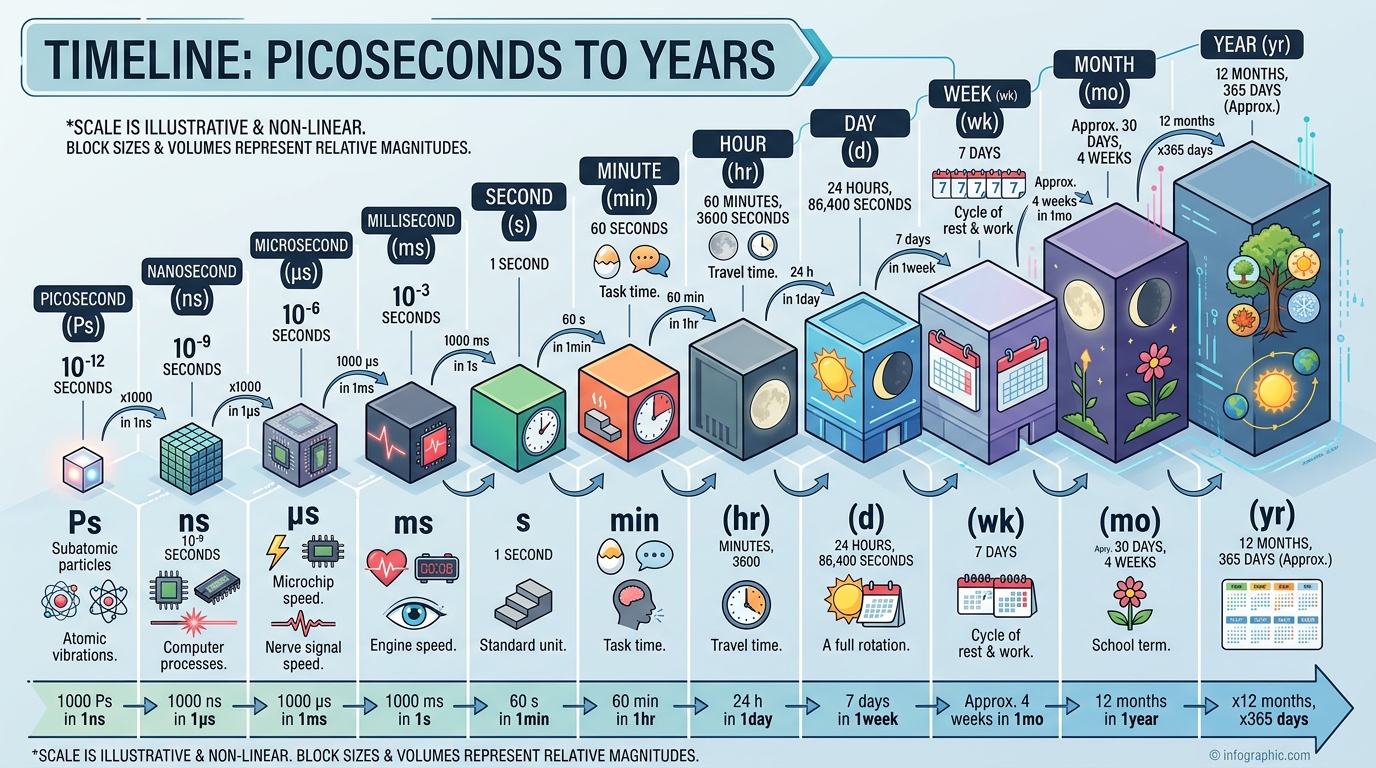
The OKemall Time Converter supports 12 distinct time units, spanning the full range from sub-atomic precision to multi-year planning. Here is what each one means and where it is used:
1. Picosecond (ps)
One trillionth of a second (10⁻¹² s). Light travels approximately 0.3 millimeters in one picosecond. Used in ultrafast laser physics, semiconductor testing, and high-frequency trading systems where latencies are measured in picoseconds. Not something you encounter in daily life, but essential in advanced computing and scientific instrumentation.
2. Nanosecond (ns)
One billionth of a second (10⁻⁹ s). Light travels about 30 centimeters in one nanosecond. RAM access times, CPU clock cycles, and network latency for fiber-optic connections are measured in nanoseconds. If you work with hardware performance or low-level programming, nanosecond precision matters.
3. Microsecond (µs)
One millionth of a second (10⁻⁶ s). Database query times, electronic signal propagation, and high-speed photography use microsecond measurements. A typical flash photograph captures light in tens to hundreds of microseconds.
4. Millisecond (ms)
One thousandth of a second (10⁻³ s). This is where time becomes perceptible. Web page load times, animation frames, audio latency, and gaming response times are all measured in milliseconds. Google's Core Web Vitals use milliseconds to define "good" user experiences. If you are a web developer, you live in milliseconds.
5. Second (s)
The SI base unit of time. Defined by the caesium-133 atom's radiation cycles, one second is the universal reference point. Seconds are the default unit for scientific calculations, API timestamps, video durations, and everyday timekeeping. The OKemall Time Converter defaults to seconds as the source unit.
6. Minute (min)
60 seconds. The most common mid-range time unit for everyday activities — cooking timers, meeting durations, exercise intervals, and music track lengths. Useful for converting between human-scale time and machine-scale time (seconds or milliseconds).
7. Hour (h)
3,600 seconds or 60 minutes. The standard unit for work shifts, travel durations, movie runtimes, and battery life. Converting between hours and smaller units is one of the most frequent time conversion tasks — and one of the easiest to get wrong mentally.
8. Day (d)
86,400 seconds or 24 hours. The fundamental unit of calendar-based planning. Project timelines, shipping estimates, hotel bookings, and subscription billing cycles all use days. Converting days to seconds or milliseconds is common in programming for setting cookie expirations, cache durations, and API rate-limit windows.
9. Week (wk)
7 days or 604,800 seconds. Used for scheduling, payroll cycles, fitness programs, and academic planning. Converting weeks to hours or days is useful for project management and resource allocation.
10. Month (mo)
A month in this tool is approximated as 30.44 days (365.25 ÷ 12), which is the average month length accounting for leap years. Real calendar months vary from 28 to 31 days, so this conversion is suitable for estimation, invoicing, and general planning. For exact calendar-based calculations, a dedicated date calculator is preferred.
11. Year (yr)
365.25 days or 31,557,600 seconds. This accounts for leap years by averaging one extra day every four years. Used for age calculation, financial forecasting, long-term planning, and scientific data spanning multiple years.
Common Time Conversion Challenges (and How the Tool Solves Them)
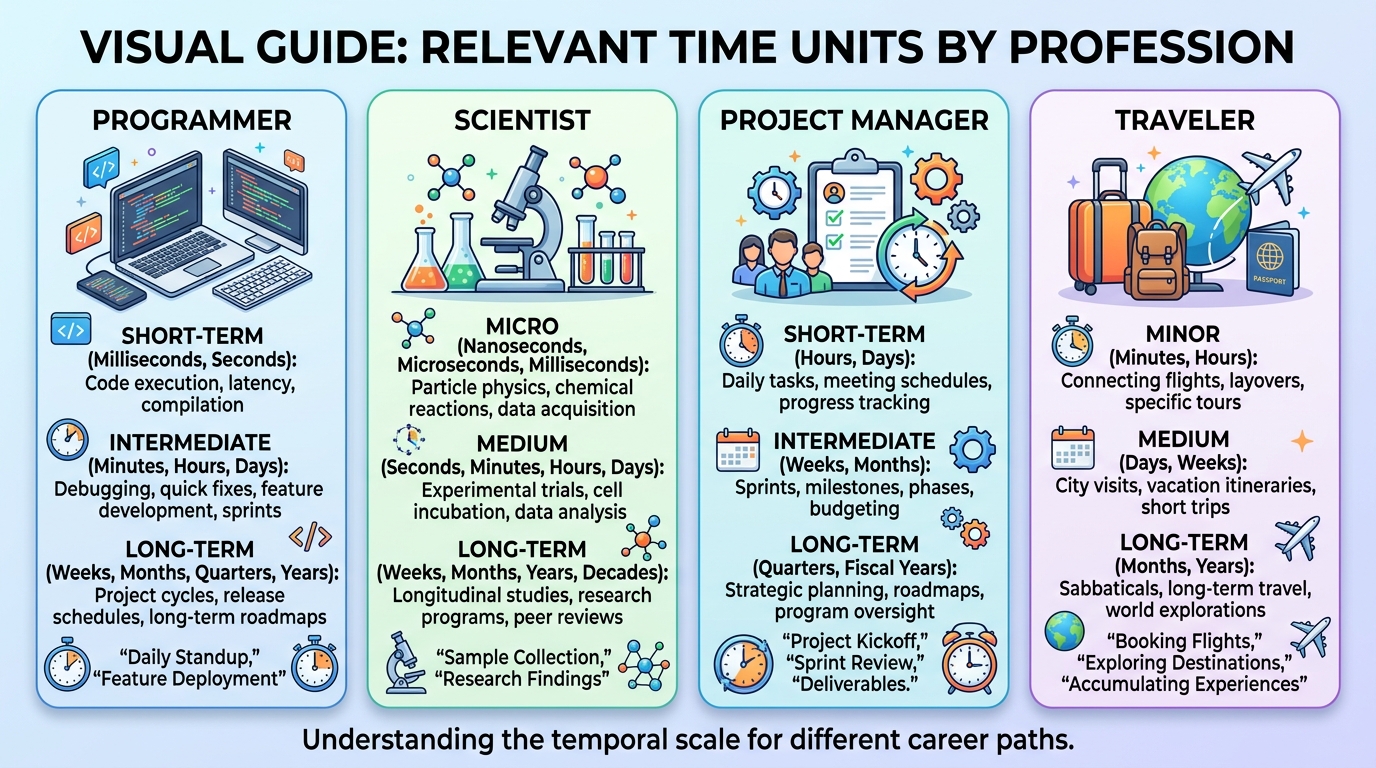
Challenge 1: Programming and Web Development You are writing JavaScript and need to set a cookie that expires in 30 days. The max-age attribute requires seconds. 30 × 24 × 60 × 60 = 2,592,000 seconds. Did you get that right on the first try? The OKemall Time Converter gives you 30 days → 2,592,000 seconds instantly, with no chance of arithmetic error.
Challenge 2: Video and Audio Editing You have a 2-hour 47-minute film and need to place chapter markers at millisecond positions. Manually converting 2 hours 47 minutes to milliseconds is tedious. Enter the hours and minutes individually (or convert the total minutes), and the tool returns accurate millisecond values for every timestamp.
Challenge 3: Project Management You are planning a 16-week project and need to estimate the total number of working hours for a resource allocation spreadsheet. 16 weeks × 7 days × 24 hours = 2,688 hours. But does your calculation account for weekends? The tool gives you the raw conversion — you can then adjust for your specific working-day arrangement.
Challenge 4: Scientific and Engineering Calculations You are working with sensor data that reports time in microseconds, but your analysis script expects seconds. Converting 3,500,000 microseconds to seconds is trivial if you know the factor (10⁶), but a single misplaced zero turns a 3.5-second event into 35 seconds. The tool eliminates that risk.
Challenge 5: Travel and Event Planning You have a flight that is 930 minutes long. How many hours and minutes is that? This is a classic compound conversion — 930 ÷ 60 = 15.5 hours, which is 15 hours and 30 minutes. The converter gives you the decimal result, which you can interpret with confidence.
Challenge 6: Everyday Life Your recipe says to bake for 5,400 seconds. Wait, what? Convert it: 5,400 seconds = 90 minutes = 1.5 hours. The tool saves you from pulling out a calculator while your hands are covered in flour.
How to Use the OKemall Time Converter: Step-by-Step
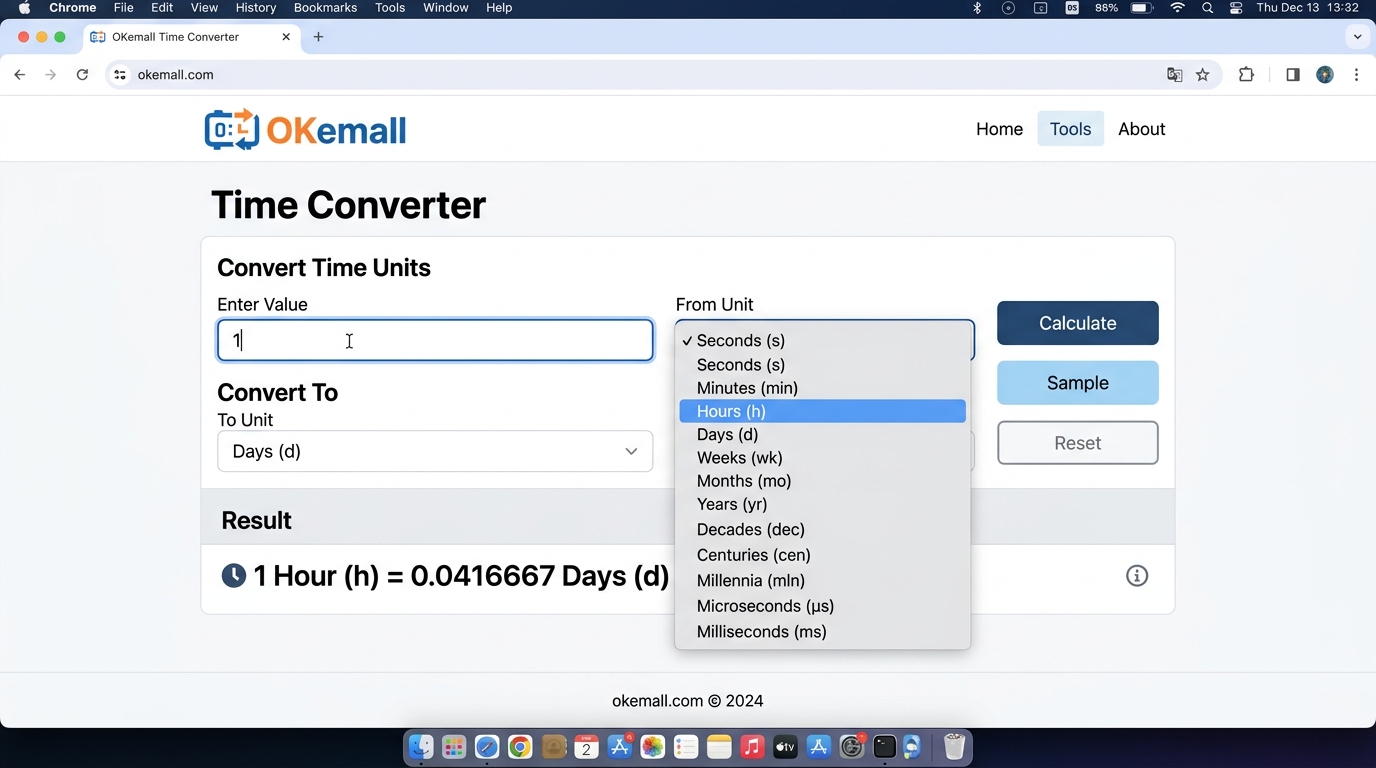
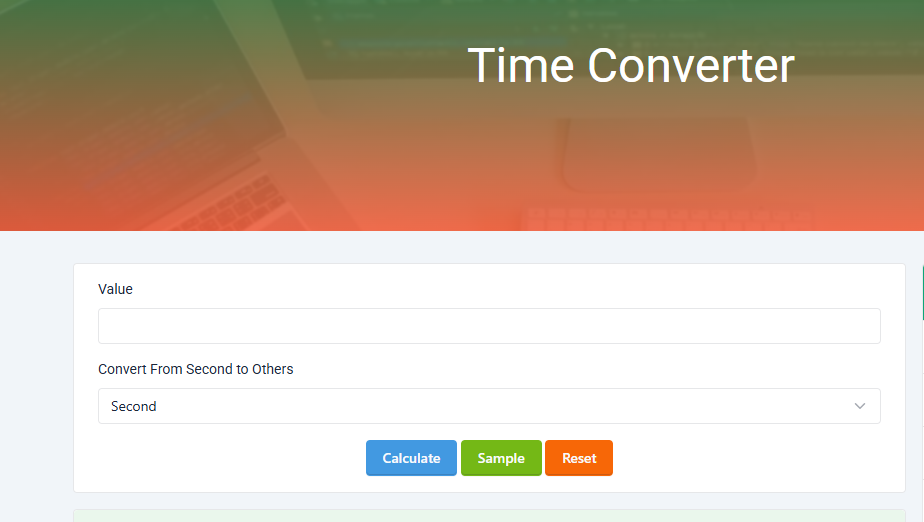
Step 1: Enter a numeric value. Type any number into the "Value" input field. You can enter whole numbers (60, 1440, 86400) or decimals (2.5, 0.001, 365.25) — the tool accepts both.
Step 2: Select the source unit. Use the dropdown menu labeled "Convert From" to choose the unit of your input value. The default is "Second," but you can select any of the 12 available units: Second, Millisecond, Microsecond, Nanosecond, Picosecond, Minute, Hour, Day, Week, Month, or Year.
Step 3: Click "Calculate." Press the teal Calculate button. The tool processes your input and returns the equivalent value in all 11 other time units. Results appear clearly labeled, making it easy to scan and find the unit you need.
Step 4 (optional): Use the Sample button. Not sure where to start? Click "Sample" to load a random value and see a complete conversion across all units. This is a great way to explore the tool's capabilities and understand the relationships between different time scales.
**Step 5 (optional): Click "Reset" to clear everything and start fresh with a new conversion.
What Makes OKemall's Time Converter Stand Out
12 units in one conversion. Enter a value in any unit, and you get results in all 11 other units simultaneously. You do not need to run separate conversions for each target unit.
Extreme range. From picoseconds (10⁻¹² s) to years, the tool spans 16 orders of magnitude. This covers every practical time scale — from high-frequency trading latency to multi-year project timelines.
Decimal-friendly input. The tool accepts decimal values (e.g., 2.5 hours, 0.001 seconds), so you are not limited to whole numbers. This is essential for precise scientific and engineering work.
No registration, no barriers. Open the page and convert immediately. No signup, no email verification, no usage limits.
Instant server-side processing. Built on Laravel Livewire, the tool processes conversions on the server and returns results without page reloads or delays.
Mobile-friendly. The responsive layout works on phones and tablets. Convert time units from anywhere — at your desk, in a meeting, or on the go.
Multi-language support. The platform supports 10 languages, making the tool accessible to a global audience.
Quick Conversion Reference Table
| From | To | Multiply By | Example |
|---|---|---|---|
| Seconds | Milliseconds | × 1,000 | 5 s = 5,000 ms |
| Seconds | Minutes | ÷ 60 | 300 s = 5 min |
| Minutes | Hours | ÷ 60 | 180 min = 3 h |
| Hours | Days | ÷ 24 | 72 h = 3 d |
| Days | Weeks | ÷ 7 | 21 d = 3 wk |
| Days | Months (avg) | ÷ 30.44 | 60 d ≈ 1.97 mo |
| Days | Years | ÷ 365.25 | 730 d ≈ 2 yr |
| Milliseconds | Seconds | ÷ 1,000 | 2,500 ms = 2.5 s |
| Microseconds | Milliseconds | ÷ 1,000 | 5,000 µs = 5 ms |
| Nanoseconds | Microseconds | ÷ 1,000 | 8,000 ns = 8 µs |
The OKemall Time Converter handles all of these relationships automatically, including the ones not shown here — you never need to look up a conversion factor again.
Pro Tips for Using the Time Converter Effectively
1. Convert compound times in stages. If you need to convert "2 hours 45 minutes 30 seconds" to milliseconds, first add them up in a single unit (e.g., convert 2 h → 7,200 s, 45 min → 2,700 s, total = 9,930 s), then enter 9930 seconds into the converter. The result in milliseconds will be 9,930,000.
2. Use as a learning tool. The converter is excellent for understanding time scales. Enter 1 in each unit and observe how the values cascade across the other units. This builds an intuitive sense of the relationships between picoseconds through years.
3. Bookmark for programming. If you write code that deals with timers, cookies, caches, or API rate limits, keep okemall.com/time-converter bookmarked. Converting user-facing durations to machine-facing values (seconds or milliseconds) becomes a one-click operation.
4. Verify by reverse conversion. When precision matters, convert your result back to the original unit as a sanity check. If 3.7 hours → 13,320 seconds, then entering 13,320 seconds should give you ≈ 3.7 hours. This catches input errors before they propagate.
5. Understand month and year approximations. The tool uses 30.44 days per month and 365.25 days per year. These are averages that work well for estimation and general use. For exact calendar-based date arithmetic (e.g., "what date is 90 days from today"), use the OKemall Days Calculator instead.
Related OKemall Tools for Time and Calculation
- Days Calculator — Calculate exact days between two calendar dates.
- Hours Calculator — Calculate hours and minutes between two times.
- Month Calculator — Calculate months between two dates.
- Age Calculator — Calculate exact age in years, months, and days.
- Percentage Calculator — Calculate percentages quickly.
- Average Calculator — Calculate the average of a set of numbers.
Frequently Asked Questions
Q: Is the OKemall Time Converter free? Yes, completely free. No signup, no limits, no hidden charges.
Q: How accurate are the month and year conversions? The tool uses average values: 30.44 days per month (accounting for 365.25-day years ÷ 12) and 365.25 days per year (accounting for leap years). This is accurate for estimation and general use but does not account for specific calendar months (28–31 days) or leap year rules (century exceptions).
Q: Can I enter decimal values? Yes. The input field accepts both whole numbers and decimals (e.g., 2.5 hours, 0.001 seconds).
Q: Does the tool convert to hours-and-minutes format (e.g., "2h 30m")? The tool returns decimal values (e.g., 2.5 hours). To interpret as hours and minutes, the decimal portion can be multiplied by 60 (0.5 h × 60 = 30 min).
Q: What is the largest value I can enter? The input accepts standard numeric values within reasonable browser and server limits. For most practical purposes, you can enter values spanning millions or billions without issue.
Q: Does the tool work on mobile? Yes, the interface is fully responsive and works on smartphones and tablets.
Time conversion is one of those tasks that seems simple until you are in the middle of it — multiplying by 60, then by 24, then by 7, then wondering if you accounted for the leap year correctly. The irregular structure of time units turns what should be a one-second task into a multi-step calculation with real potential for error.
The OKemall Time Converter reduces that entire process to three actions: enter a number, choose a unit, click Calculate. It handles all 12 time units, from picoseconds used in high-speed electronics to years used in long-term planning, with instant server-side accuracy.
Whether you are a developer converting days to milliseconds for a cookie expiry, a student solving physics problems, a project manager estimating timelines, or just someone who wants to know how many seconds are in a year without doing the math — this tool belongs in your bookmarks.
Stop doing time conversion in your head. Try the OKemall Time Converter now — free, accurate, and always ready.

.png)