 English
 العربية
 Deutsch
 Español
 Français
 Italiano
 Português
 Русский
 Türkçe
 Tiếng Việt

Free Online Loan Calculator — Calculate Monthly Payments, Total Interest & Amortization

Introduction
Taking out a loan is one of the biggest financial decisions most people make — whether it is a mortgage for a home, financing for a car, a personal loan for debt consolidation, or a business loan for expansion. And the single most important question before signing any loan agreement is simple: what will this actually cost me, month by month?
Lenders give you three numbers: the loan amount, the interest rate, and the term. But translating those three numbers into a clear picture of your monthly payment, total interest, and total repayment requires math that most people do not carry around in their heads. The standard loan amortization formula involves exponents, monthly rate conversions, and compound interest — get any piece wrong and your estimate is off by hundreds or thousands of dollars.
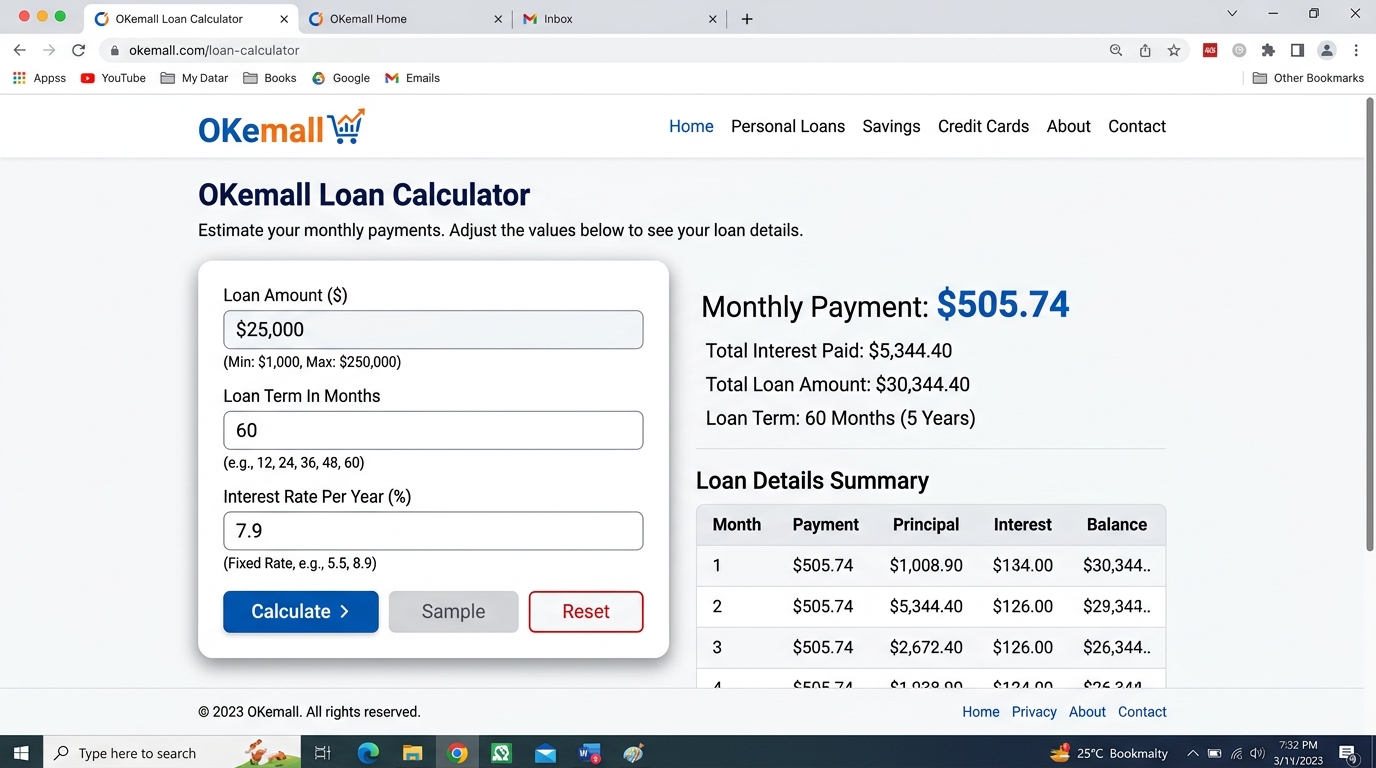
The OKemall Loan Calculator eliminates this uncertainty. Enter the loan amount, the term in months, and the annual interest rate, and it instantly calculates your monthly payment, total interest cost, and overall repayment amount. No formula memorization, no spreadsheet setup, no risk of error.
In this guide, we will explain how loan amortization works, walk through common loan scenarios, and show you how to use the OKemall Loan Calculator to make confident borrowing decisions.
Why You Should Never Guess Your Loan Payments
When you are comparing loan offers — maybe a 60-month car loan at 6.5% from one lender versus a 72-month loan at 5.9% from another — the numbers are just close enough that mental estimation fails. Here is why guessing is dangerous:
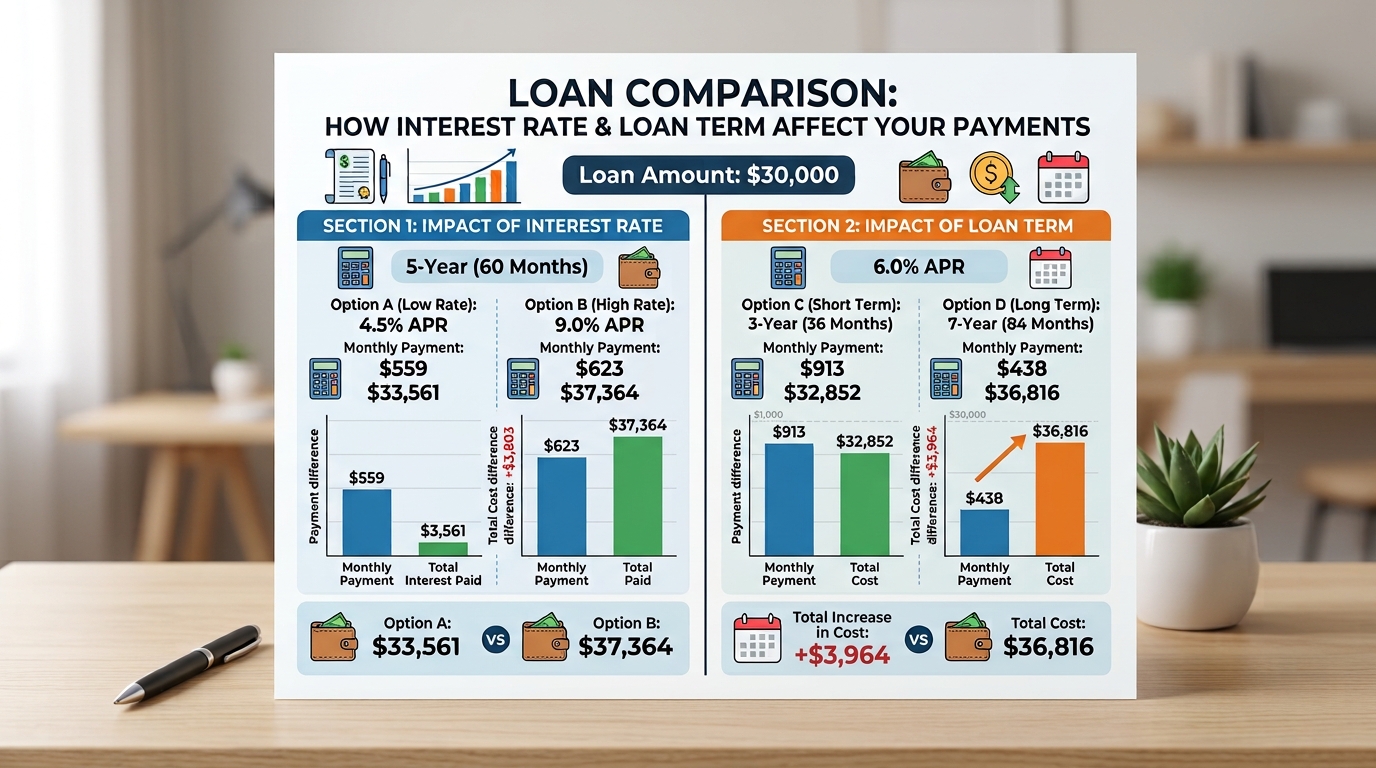
The interest rate effect is non-linear. A 1% difference in interest rate does not mean a 1% difference in total cost. On a 25,000loanover5years,thedifferencebetween5680 in total interest — not $250. The compounding effect of interest over time amplifies small rate differences significantly.
Term length dramatically changes total cost. A 72-month loan at a lower rate can cost more in total interest than a 60-month loan at a higher rate, because you are paying interest for an extra year. Without calculating both scenarios side by side, you cannot know which offer is genuinely cheaper.
Monthly payment vs. total cost trade-off. A longer term lowers your monthly payment — which feels good in the short term — but increases total interest paid. The loan calculator shows both numbers so you can make an informed trade-off.
Prepayment and early payoff planning. If you plan to pay off a loan early, you need to know your outstanding balance at different points. The amortization structure means early payments are mostly interest; knowing this changes your prepayment strategy.
An online loan calculator gives you clarity on all four of these factors before you commit to any loan.
How Loan Amortization Works
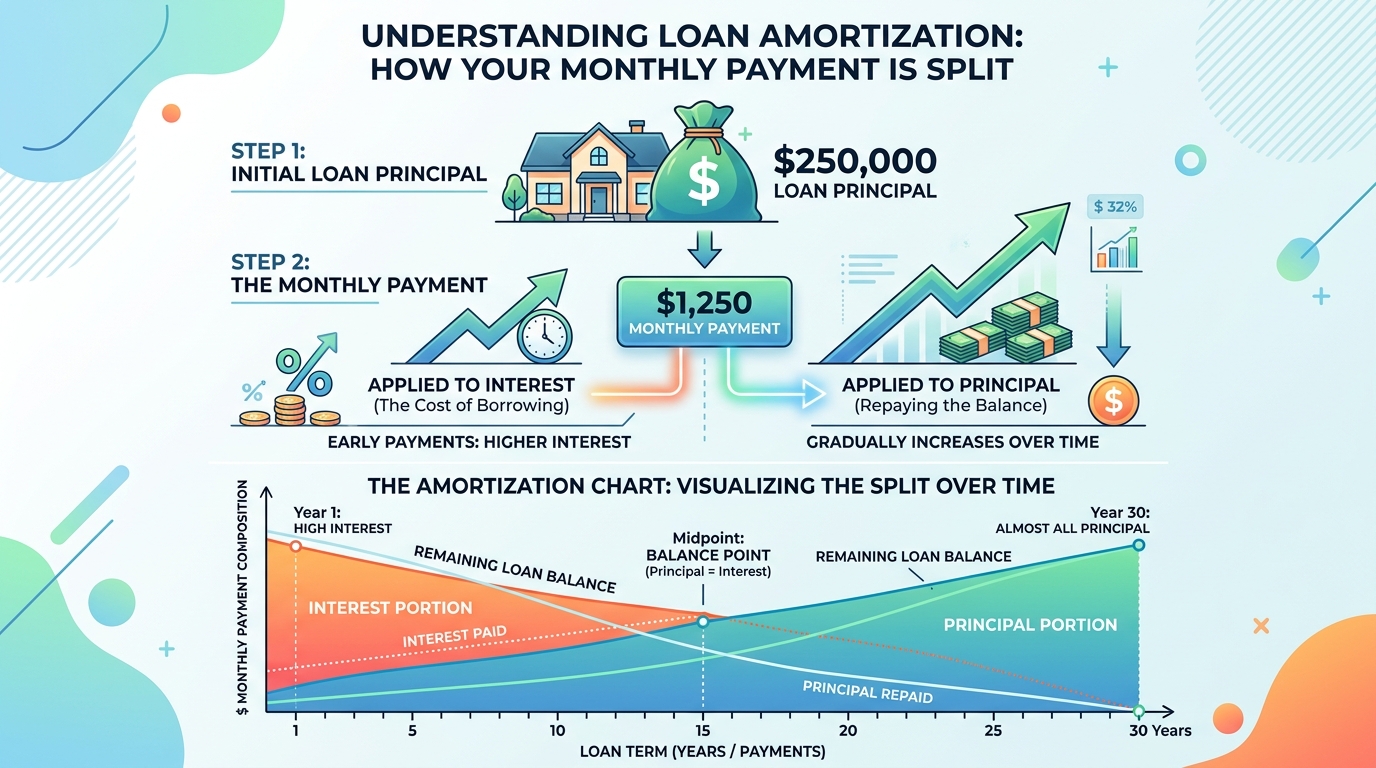
Most personal, auto, and mortgage loans use fixed-rate amortization: you pay the same amount every month, but the split between principal and interest changes over time. Here is the formula behind it:
Monthly Payment = P × [r(1+r)^n] / [(1+r)^n − 1]
Where:
- P = Loan principal (the amount borrowed)
- r = Monthly interest rate (annual rate ÷ 12)
- n = Total number of months
Example: A $20,000 loan at 7% annual interest for 60 months (5 years).
- Monthly rate: 7% ÷ 12 = 0.5833% = 0.005833
- Monthly payment = 20,000 × [0.005833 × (1.005833)^60] / [(1.005833)^60 − 1]
- Monthly payment ≈ $396.02
- Total repayment = 396.02×60=∗∗23,761.20**
- Total interest = 23,761.20−20,000 = $3,761.20
Key insight: In month one of this loan, roughly 116.67ofyour396 payment goes to interest and only $279.35 goes to principal. By month 60, nearly the entire payment goes to principal. This is called an amortization curve, and it matters because early extra payments save you far more interest than late extra payments.
The OKemall Loan Calculator handles all of this math instantly. You enter the three values and get accurate results — no exponents to type, no monthly rate conversion to get wrong.
Common Loan Scenarios and How to Use the Calculator
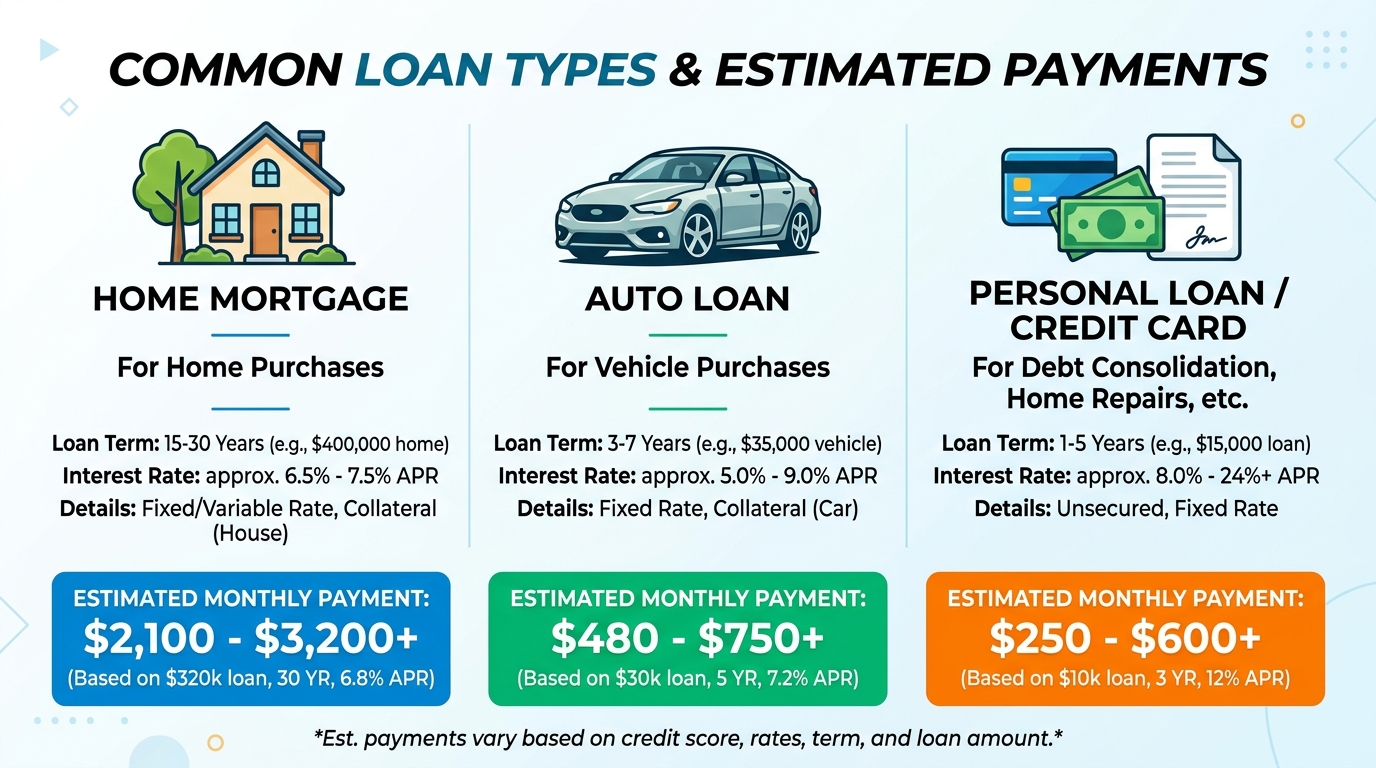
Scenario 1: Mortgage Planning You are considering a 300,000homeloanat6.51,896. Total interest over 30 years: roughly 382,600.Nowcomparethesameloanat6.01,799, and total interest drops to 347,500—a35,000 difference from a 0.5% rate reduction. The calculator makes this comparison immediate.
Scenario 2: Car Financing A dealership offers you two options on a 28,000car:60monthsat4.9527/month, 3,620totalinterest.Option2:457/month, 4,904totalinterest.Thelongertermsavesyou70 per month but costs $1,284 more overall. Seeing both numbers side by side helps you decide what matters more — monthly cash flow or total cost.
Scenario 3: Personal Loan Comparison You are comparing a 10,000personalloanat1210,000 at 10.5% for 48 months from Bank B. Bank A: 332/month,1,957 total interest. Bank B: 256/month,2,291 total interest. Bank B's monthly payment is 76lower,butyoupay334 more in total interest and are in debt for an extra year. The calculator reveals this trade-off clearly.
Scenario 4: Student Loan Repayment You have 35,000instudentloansat5.5380/month, 10,576totalinterest.15years(180months):286/month, 16,504totalinterest.The15−yearplansaves94 per month but costs nearly $6,000 more over the life of the loan. For many borrowers, this is a difficult but necessary trade-off — and the calculator quantifies it exactly.
Scenario 5: Business Loan Evaluation You need 50,000forequipmentfinancingat81,221. Total interest: 8,590.Youcannowdeterminewhethertheequipmentwillgenerateenoughadditionalrevenuetocoverthe1,221 monthly payment — and whether the $8,590 in financing costs makes the investment worthwhile.
How to Use the OKemall Loan Calculator: Step-by-Step
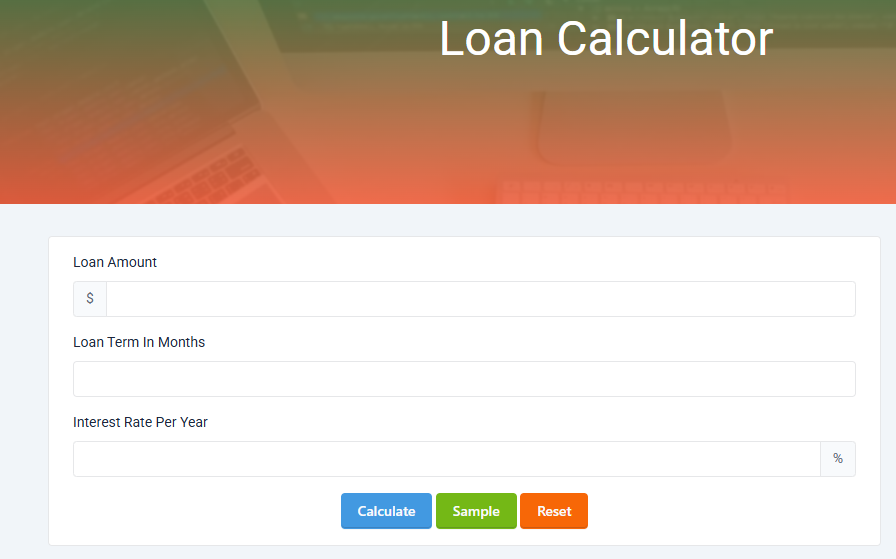
Step 1: Enter the loan amount. Type the total amount you plan to borrow into the "Loan Amount" field. The dollar sign prefix is already shown — just enter the number. You can use whole numbers (25000) or decimals (14999.99).
Step 2: Enter the loan term in months. Type the loan duration into the "Loan Term In Months" field. Convert years to months first: a 5-year loan = 60 months, a 3-year loan = 36 months, a 30-year mortgage = 360 months.
Step 3: Enter the interest rate. Type the annual interest rate (APR) into the "Interest Rate Per Year" field. Enter just the number — the percent sign is already appended. For 6.5%, enter 6.5. For 10%, enter 10.
Step 4: Click "Calculate." Press the teal Calculate button. The tool processes your inputs via Livewire and returns your monthly payment, total interest, and total repayment amount. Results appear without page reload.
Step 5 (optional): Use the Sample button. Click the lime "Sample" button to load random example values and see how the calculator works before entering your own numbers.
**Step 6 (optional): Click "Reset" to clear all fields and start fresh.
What Makes OKemall's Loan Calculator Stand Out
Three inputs, everything you need. Loan amount, term in months, and annual interest rate — these are the only three numbers any standard amortized loan requires, and that is exactly what the calculator asks for. No unnecessary fields, no confusing options.
Instant server-side calculation. Built on Laravel Livewire, loan amortization calculations run on the server using precise floating-point math. You are not relying on client-side JavaScript that could differ between browsers.
No registration, no barriers. Open the page and calculate immediately. No signup, no email collection, no usage limits.
Sample button for quick testing. Load example values with one click to understand the calculator's output format before entering your real loan data.
Mobile-friendly. The responsive layout works on any device. Calculate loan payments from your phone while sitting at a dealership, in a bank, or during a meeting with a financial advisor.
Multi-language support. The platform supports 10 languages (English, Arabic, German, Spanish, French, Italian, Portuguese, Russian, Turkish, Vietnamese), making the calculator accessible worldwide.
Understanding Your Results
When you click Calculate, the OKemall Loan Calculator returns three key figures:
Monthly Payment: The fixed amount you will pay each month for the entire loan term. This covers both principal and interest. It is the number you need for your monthly budget.
Total Interest: The total interest you will pay over the full life of the loan. This is the cost of borrowing — the amount above and beyond the principal. Comparing total interest across loan offers reveals which is truly cheaper.
Total Repayment: The sum of the principal plus all interest. This is the total amount that will leave your bank account over the life of the loan. Seeing this number in full — often tens or hundreds of thousands of dollars more than the amount borrowed — is a powerful reality check.
Pro Tips for Loan Planning
1. Always compare at least three scenarios. Before accepting any loan offer, run the calculator with: the offered rate and term, a slightly lower rate (to see what a better credit score could save you), and a shorter term (to see the trade-off between monthly payment and total cost).
2. Use the "stress test" approach. Calculate your payment with the offered rate, then run it again at 2–3% higher. If your budget cannot handle the higher payment, you may be borrowing too close to your limit — adjustable-rate loans and future refinancing can change your rate.
3. Factor in additional costs. A mortgage payment includes property tax, insurance, and possibly PMI — which the calculator does not include. A car loan may include gap insurance and extended warranties. The loan calculator gives you the pure loan payment; add these extras separately for your full monthly budget.
4. Calculate the savings from a larger down payment. Reducing the loan amount by 5,000or10,000 (via a larger down payment) changes both the monthly payment and total interest. Run the calculator with different principal amounts to see the long-term impact of putting more money down.
5. Verify the lender's math. Before signing, run the offered terms through the calculator. If the lender's quoted monthly payment does not match, ask why. Origination fees, processing charges, or insurance products may be bundled into the payment — and you should know about every dollar.
6. Plan prepayments strategically. If you can afford to pay extra, focus extra payments on the earliest months. Because early payments are mostly interest, paying additional principal early reduces the total interest dramatically — far more than the same extra payment near the end of the term.
Related OKemall Tools for Financial Planning
- Discount Calculator — Calculate sale prices and savings from percentage discounts.
- Sales Tax Calculator — Add sales tax to purchases and loan-funded items.
- GST Calculator — Calculate GST-inclusive and GST-exclusive prices.
- Margin Calculator — Calculate profit margins when pricing products funded by business loans.
- Percentage Calculator — General percentage calculations for any financial context.
- Stripe Fee Calculator — Calculate payment processing fees for online transactions.
Frequently Asked Questions
Q: Is the OKemall Loan Calculator free? Yes, completely free. No signup, no registration, no usage limits.
Q: What type of loans does this calculator work for? It works for any fixed-rate amortized loan — mortgages, auto loans, personal loans, student loans, business term loans, and equipment financing. It does not work for revolving credit (credit cards), interest-only loans, or variable-rate loans with rate changes.
Q: Does the calculator include taxes, insurance, or fees? No. The calculator computes principal and interest only. For mortgages, add property tax and homeowner's insurance separately. For auto loans, add registration, insurance, and any dealer fees separately.
Q: Can I enter a decimal interest rate? Yes. Enter values like 6.5, 4.25, or 10.99 — the calculator handles decimal interest rates precisely.
Q: Does the calculator show an amortization schedule? The tool returns monthly payment, total interest, and total repayment. For a full month-by-month amortization table, you can use these results in a spreadsheet.
Q: How do I convert years to months? Multiply the number of years by 12. A 5-year loan = 60 months, a 15-year mortgage = 180 months, a 30-year mortgage = 360 months.
Q: Does the tool work on mobile? Yes, the interface is fully responsive and works on smartphones and tablets.
A loan is a long-term commitment, and the numbers behind it should never be a mystery. Three inputs — how much you borrow, for how long, and at what rate — determine exactly what you will pay each month and what the loan will cost in total. Getting those numbers right before you sign saves you from surprises that can last years.
The OKemall Loan Calculator turns those three inputs into clear, instant answers. It handles the complex amortization math so you can focus on the decisions that matter: which lender to choose, whether a longer term is worth the lower payment, how much interest you will really pay, and whether your budget can comfortably absorb the monthly commitment.
Bookmark it. Use it before every loan decision — whether you are buying a home, financing a car, consolidating debt, or funding your business. Three inputs, one click, complete clarity.
Know your numbers before you sign. Try the OKemall Loan Calculator now — free, accurate, and ready when you are.

.png)