 English
 العربية
 Deutsch
 Español
 Français
 Italiano
 Português
 Русский
 Türkçe
 Tiếng Việt
What Is My IP Address? Complete Guide to Find & Understand Your IP
What Is My IP – Complete Guide to Understanding Your IP Address
Every time you connect to the internet, your device is assigned a unique identifier called an IP address. Whether you are browsing a website, sending an email, or streaming a video, your IP address is working quietly in the background, making all of it possible. Yet most people never think about it — until they need to know what their IP is.
If you have ever asked yourself "what is my IP?" you are not alone. This is one of the most commonly searched tech questions on the internet. In this comprehensive guide, we will break down exactly what an IP address is, how it works, why it matters, and how you can find yours in seconds.
What Exactly Is an IP Address?
IP stands for Internet Protocol. An IP address is a numerical label assigned to every device that participates in a computer network that uses the Internet Protocol for communication. Think of it as a mailing address for your device on the internet.
Just as your home has a physical address so that the postal service knows where to deliver your mail, your device has an IP address so that websites and online services know where to send the data you request. Without an IP address, the internet simply could not function.
An IP address typically looks something like this:
- IPv4 Example:
192.168.1.45 - IPv6 Example:
2001:0db8:85a3:0000:0000:8a2e:0370:7334
These numbers may look random, but they follow a specific structure governed by international standards.
The Two Types of IP Addresses: IPv4 vs IPv6
There are two primary versions of IP addresses in use today: IPv4 and IPv6.
IPv4 (Internet Protocol Version 4)
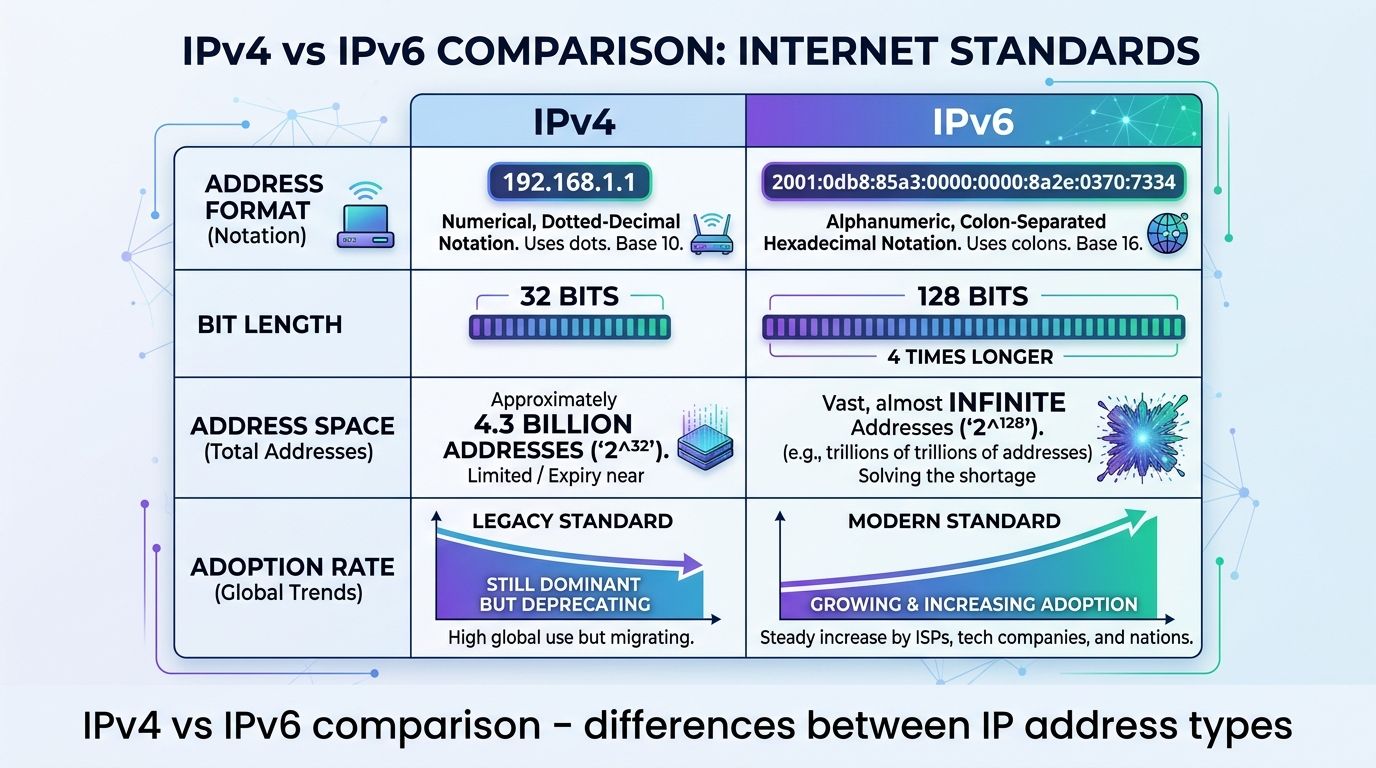
IPv4 has been the backbone of internet addressing since the early 1980s. It uses a 32-bit addressing scheme, which allows for approximately 4.3 billion unique addresses. An IPv4 address consists of four sets of numbers separated by dots, with each number ranging from 0 to 255.
For a long time, 4.3 billion addresses seemed more than enough. However, with the explosive growth of the internet — smartphones, tablets, IoT devices, smart TVs — we have essentially run out of available IPv4 addresses.
IPv6 (Internet Protocol Version 6)
To solve the IPv4 exhaustion problem, IPv6 was introduced. It uses a 128-bit addressing scheme, which provides an almost incomprehensible number of unique addresses — roughly 340 undecillion (that is 340 followed by 36 zeros). This ensures we will not run out of IP addresses anytime soon.
IPv6 addresses are written in hexadecimal format, using both numbers and letters, separated by colons. While IPv6 adoption has been slow, it is steadily growing as more internet service providers and websites make the transition.
Public IP vs Private IP: What Is the Difference?
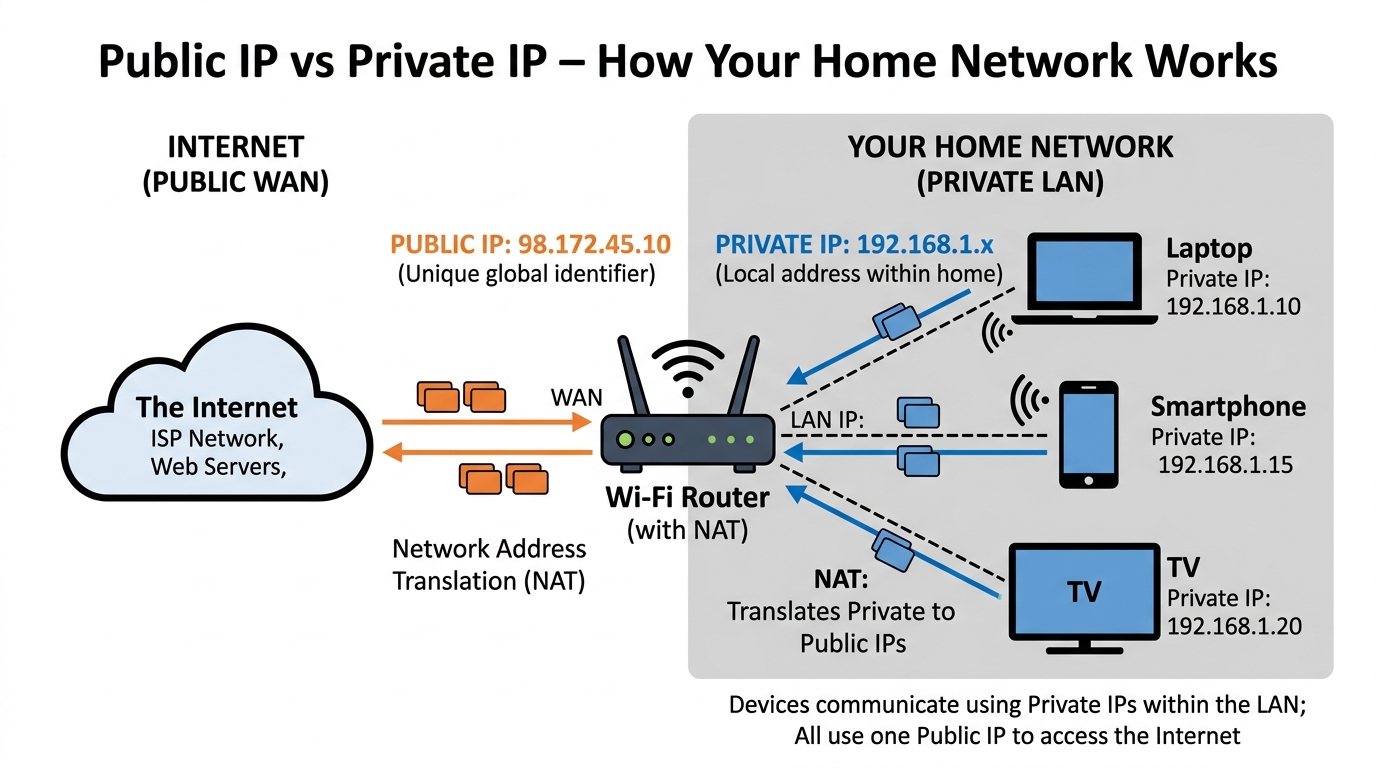
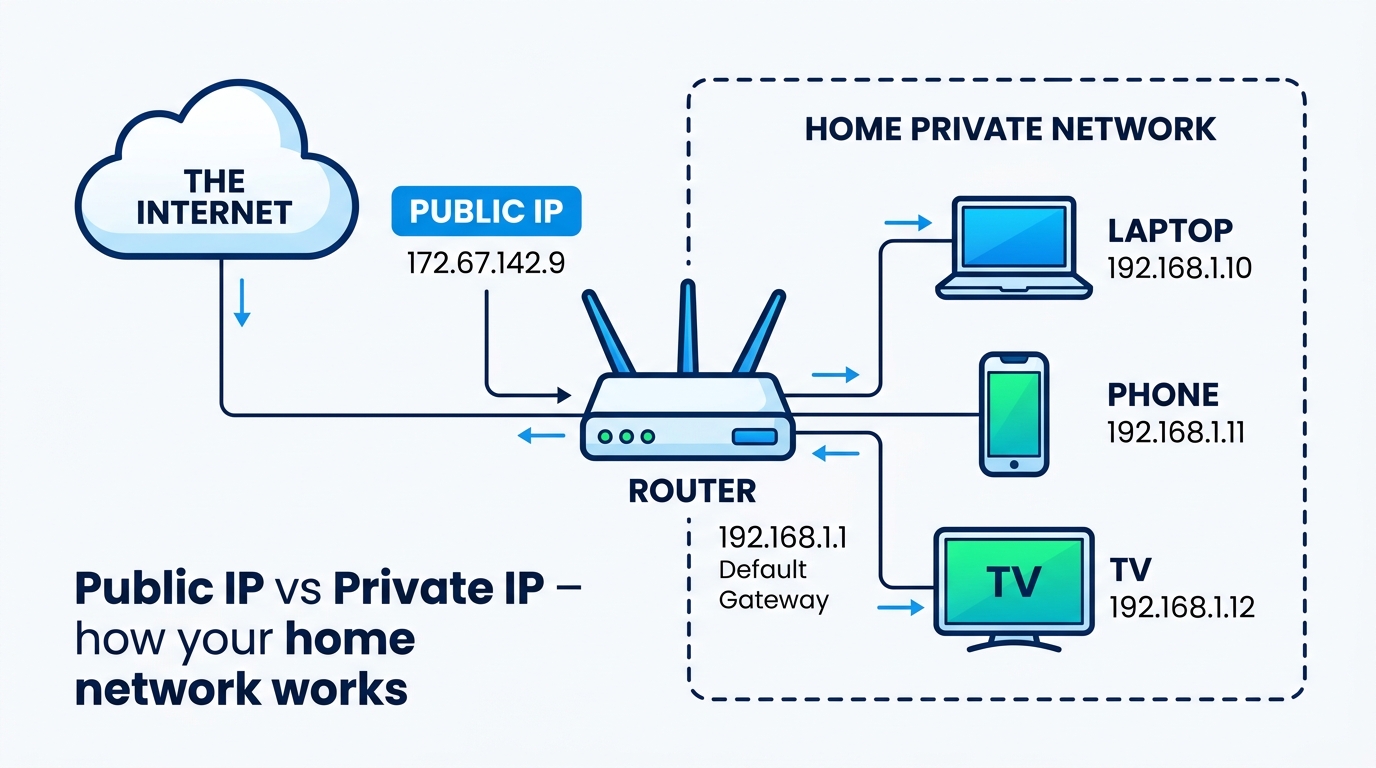
This is where many people get confused. Your device actually has two different IP addresses in most cases — a public one and a private one.
Public IP Address
Your public IP address is the one that is visible to the outside world. It is assigned by your Internet Service Provider (ISP) and is shared by all devices connected to your home network. When you visit a website, the website sees your public IP address, not the individual IP of your phone or laptop.
This is the IP address that tools like "what is my IP" checkers will show you.
Private IP Address
Your private IP address is used within your local network. Your router assigns a private IP to each device on your home network — your phone, laptop, smart TV, printer, etc. Private IP addresses are not visible on the internet.
Private IP ranges include:
10.0.0.0to10.255.255.255172.16.0.0to172.31.255.255192.168.0.0to192.168.255.255
If you look at your phone's network settings right now, you will likely see an IP address starting with 192.168.x.x — that is your private IP.
How to Find Your IP Address
Finding your IP address is straightforward. Here are the most common methods:
Method 1: Use an Online IP Lookup Tool
The easiest way is to visit a website like okemall.com/what-is-my-ip. The moment the page loads, it will automatically detect and display your public IP address along with additional details such as:
- Your approximate location (city, state, country)
- Your ISP name
- Whether your IP is IPv4 or IPv6
- Whether you are using a VPN or proxy
No installation or technical knowledge is required.
Method 2: Find Your Private IP on Windows
- Press
Win + Rto open the Run dialog - Type
cmdand press Enter - In the Command Prompt, type
ipconfigand press Enter - Look for "IPv4 Address" under your active network connection
Method 3: Find Your Private IP on Mac
- Click the Apple menu → System Settings
- Click Network
- Select your active connection (Wi-Fi or Ethernet)
- Your IP address will be listed under "Details"
Method 4: Find Your Private IP on Mobile Devices
On iPhone: Settings → Wi-Fi → Tap the (i) icon next to your network → Look for IP Address
On Android: Settings → Network & Internet → Wi-Fi → Tap your connected network → Look for IP Address
Why Does Knowing Your IP Address Matter?
Understanding your IP address is not just a technical exercise — it has real, practical implications for your digital life.
1. Troubleshooting Network Issues
If your internet is not working properly, knowing your IP address can help diagnose the problem. Network technicians often ask for your IP address when troubleshooting connectivity issues.
2. Remote Access and Port Forwarding
If you want to access your home computer remotely, set up a security camera system, or host a game server, you need to know your public IP address and configure port forwarding on your router.
3. Online Privacy and Security
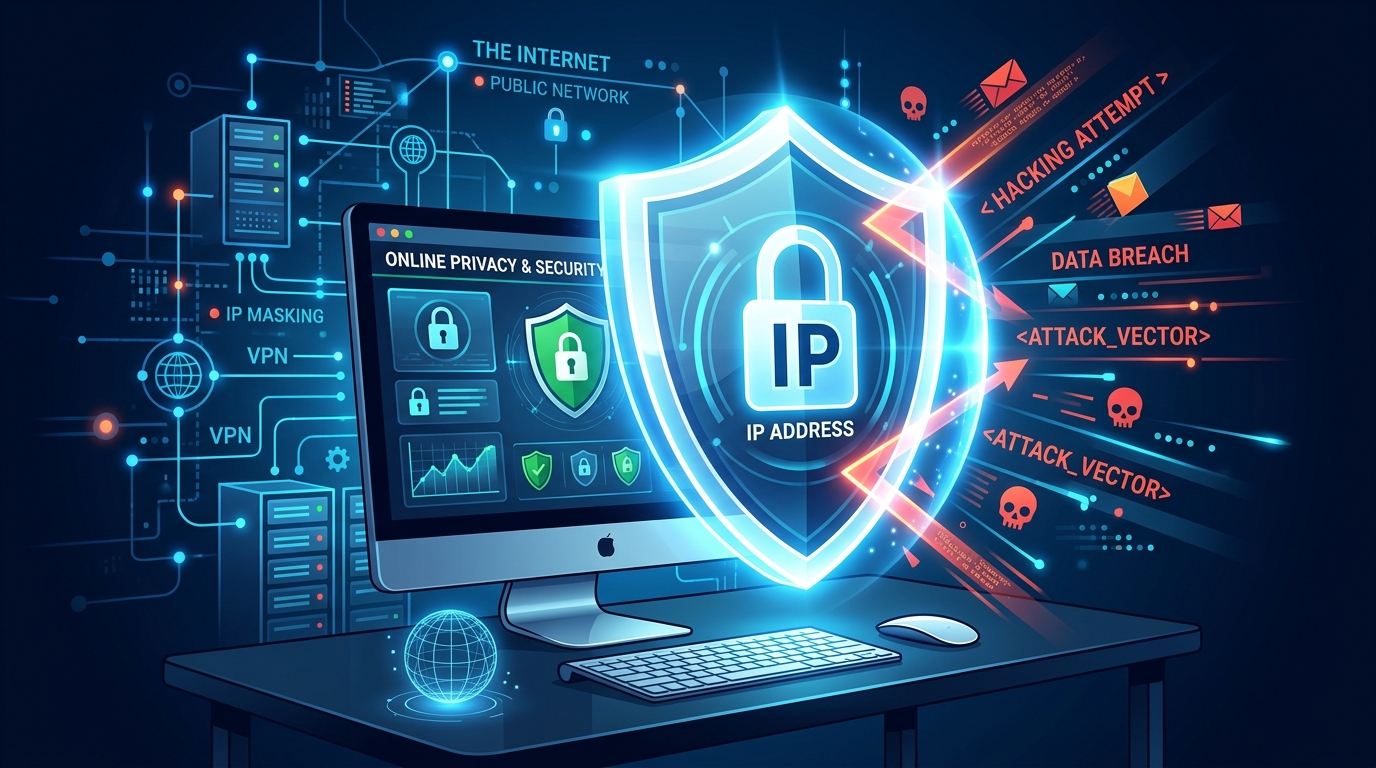
Your IP address reveals your approximate geographic location and your ISP. Websites, advertisers, and even malicious actors can use this information. Understanding your IP helps you take steps to protect your privacy.
4. Accessing Geo-Restricted Content
Many streaming services and websites restrict content based on your IP address's location. Knowing your IP helps you understand why certain content might be unavailable in your region.
5. Avoiding IP Bans
Sometimes your IP address can get blacklisted or banned from a service — even if you did nothing wrong (this can happen if someone else on your network or with a similar IP from your ISP caused the ban). Checking your IP helps you identify if this is the issue.
Can Someone Track Me With My IP Address?
This is one of the most common concerns people have. The short answer is: yes, partially — but not as precisely as many people fear.
Here is what someone can find out from your IP address alone:
What they CAN see:
- Your approximate city or region
- Your Internet Service Provider
- Your timezone (sometimes)
- Whether you are likely using a VPN or proxy
What they CANNOT see:
- Your exact home address or street
- Your name, phone number, or email
- Your personal files, photos, or passwords
- Your browsing history
To get more detailed information about you, someone would need to request it from your ISP, which typically requires a legal process such as a court order or subpoena.
That said, it is still a good practice to be mindful of who can see your IP address.
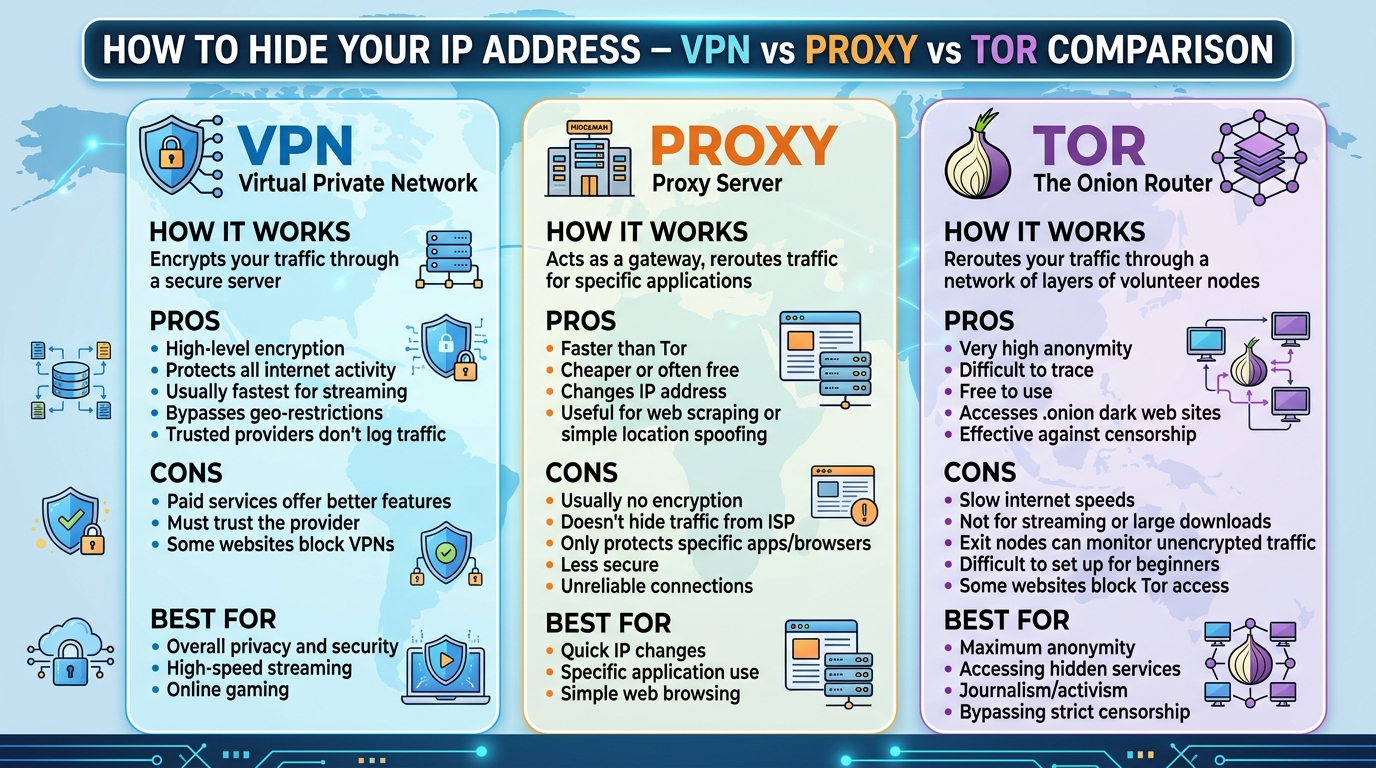
How to Hide or Change Your IP Address
If you want to protect your privacy or access content from a different region, there are several ways to hide or change your IP address:
1. Use a VPN (Virtual Private Network)
A VPN is the most effective and popular method. It routes your internet traffic through an encrypted server in a location of your choice, replacing your real IP address with the VPN server's IP. This makes it appear as though you are browsing from that location.
2. Use a Proxy Server
A proxy server acts as an intermediary between your device and the internet. It can mask your IP address, but most proxies do not encrypt your traffic, making them less secure than VPNs.
3. Use the Tor Browser
Tor (The Onion Router) routes your traffic through multiple volunteer-operated servers, making it extremely difficult to trace your IP address back to you. It is highly secure but can be significantly slower than regular browsing.
4. Switch to Mobile Data
If you simply need a different IP address quickly, switching from Wi-Fi to your mobile data connection will give you a different public IP address assigned by your mobile carrier.
5. Contact Your ISP
In some cases, you can request a new IP address from your ISP. This is more common with dynamic IP addresses (which most residential connections use). Simply restarting your router may also assign you a new IP.
Static IP vs Dynamic IP
Another important distinction to understand is the difference between static and dynamic IP addresses.
Static IP Address
A static IP address does not change. It is permanently assigned to your device or network. Static IPs are typically used by:
- Businesses that host their own servers
- Websites and online services
- Security camera systems
- Remote access setups
Most internet service providers charge an additional fee for a static IP address.
Dynamic IP Address
A dynamic IP address changes periodically. Your ISP has a pool of IP addresses and assigns one to your connection each time you go online. If you restart your router, you may receive a different IP address. Most home internet connections use dynamic IPs because they are more cost-effective and easier to manage.
What Is IP Geolocation?
IP geolocation is the process of determining the approximate geographic location of a device based on its IP address. This technology is used by:
- Websites to show localized content and currency
- Streaming services to enforce regional content restrictions
- Advertisers to serve location-relevant ads
- Security systems to detect suspicious login attempts from unusual locations
- Law enforcement to investigate cybercrime
It is important to note that IP geolocation is not exact. It can typically identify the city or metro area accurately, but it cannot pinpoint a specific street address or building.
Frequently Asked Questions About IP Addresses
Is it illegal for someone to know my IP address? No. Your IP address is publicly visible to every website you visit, every email you send, and every online service you use. It is a fundamental part of how the internet works.
Can two devices have the same IP address? On the public internet, no — each public IP must be unique. However, on a private network, multiple devices can share the same public IP through a process called NAT (Network Address Translation). Each device will have its own unique private IP.
How often does my IP address change? If you have a dynamic IP (most home connections), it can change every time you restart your router, or your ISP may change it at regular intervals — sometimes daily, sometimes weekly, or sometimes less frequently.
Does incognito mode hide my IP address? No. Incognito or private browsing mode only prevents your browser from saving your local browsing history, cookies, and site data. It does not hide your IP address from websites or your ISP.
Can my IP address get hacked? An IP address itself cannot be "hacked" in the traditional sense. However, knowing your IP can make it slightly easier for attackers to target your network with DDoS attacks or attempt to find vulnerabilities in your router. Using a firewall and keeping your router firmware updated helps mitigate these risks.
[Suggested Image: A clean FAQ section design with question mark icons, giving the article a professional and trustworthy look. Alt text: "Frequently asked questions about IP addresses"]
Final Thoughts
Your IP address is one of the most fundamental components of your online existence. It connects you to the digital world, enables communication between devices, and makes the internet as we know it possible.
Whether you are troubleshooting a network issue, setting up remote access, concerned about your online privacy, or simply curious — knowing how to check and understand your IP address is a valuable skill in today's connected world.
The next time you find yourself asking "what is my IP?", simply visit a reliable IP lookup tool like okemall.com/what-is-my-ip and get your answer instantly — along with all the useful details about your connection that help you understand your place on the internet.
Stay informed, stay secure, and make the most of your online experience.

Popular Tools
Recent Posts